
When more calls come in than people can answer, the queue is the difference between “we’ll hold your place” and a busy signal. Cannon VoIP includes real contact-center queueing on every account, the kind of holding, routing, and supervising features usually sold as a separate product tier.
How calls get to agents
Tools for supervisors
Skill-based routing sends calls to the agents equipped to handle them. Whisper lets a supervisor coach an agent mid-call without the caller hearing; barge lets them join when it’s needed. Supervisors can listen, whisper or barge from the portal or the Windows app. Queue recordings and call history keep training grounded in real calls, and supervisor controls keep all of it in the manager’s hands, not a support ticket.
A wallboard for the whole room
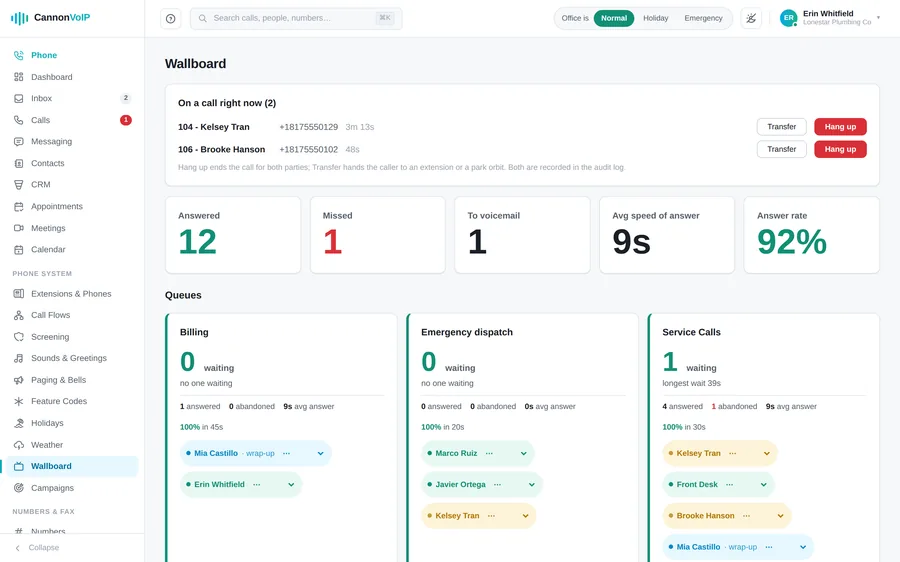
The wallboard is made for a wall screen and refreshes every five seconds. Each queue shows callers waiting, the longest wait, and today’s answered, abandoned and service level against the answer-time target you set. Every agent shows as available, busy, wrap-up, away or offline. Supervisors can transfer, park or end a live call right from the wallboard, and every supervisor action is logged with the person’s name.
After the call
- Speaker-separated transcripts: recorded calls are transcribed with each speaker’s voice separated, with a short summary of every recorded call.
- Search by what was said: find calls by the words in them, not just the number.
- Coaching reviews: optional reviews give five scores and up to three notes per call. Themes roll up per person on Analytics, framed as coaching, not a league table.
- Post-call surveys: build short surveys with yes/no or 1 to 5 questions. Callers answer on their keypad after the call, and you see results per question as percentages and averages.
Outbound: a power dialer with guardrails
Queues handle calls coming in. For calls going out, the power dialer paces calls to the agents who are free:
- Paste leads one per line, with names. Every skipped lead is reported with the reason.
- Calls only go out between 8am and 9pm in the lead’s own local time, and no setting can widen that.
- Opt-outs are permanent and checked at import and again at dial time.
- Attempt caps and spacing between attempts, and every call shows one of your real numbers.
- The dialer never launches more calls than your available agents can take, and a campaign that abandons too many answered calls pauses itself.
When the queue shouldn’t be the answer
- Overflow: when waits get long, spill calls to another team, to voicemail with transcription, or to our Live Answering service so a real person still picks up.
- After hours: queues follow your business hours and holiday calendar, and night mode lets a queue keep its own hours and closed destination.
- Every queue gets a voice: a one-click AI greeting names the queue in the voice you choose, or type the words or upload a recording. The entrance greeting plays once, before the hold music starts.
Queues are configured in the self-service portal and included with service, part of the $34/extension plan, not a contact-center surcharge.
Queues shine hardest under seasonal load: see how the trades use them on our home services page.
Calls stacking up?
Tell us how your team answers and we’ll design queues that fit, routing, callbacks, and all.
Talk to us about queueing