Serving businesses nationwide
Cannon VoIP Contact Us
Cannon VoIP cloud business phone network
The Cannon VoIP App

Your business line, everywhere you work.

Now accessible on the web and every device, plus supported desk phones. One extension, one number, one seamless experience across your whole team.

Web iOS Android Windows Mac Linux Desk phones
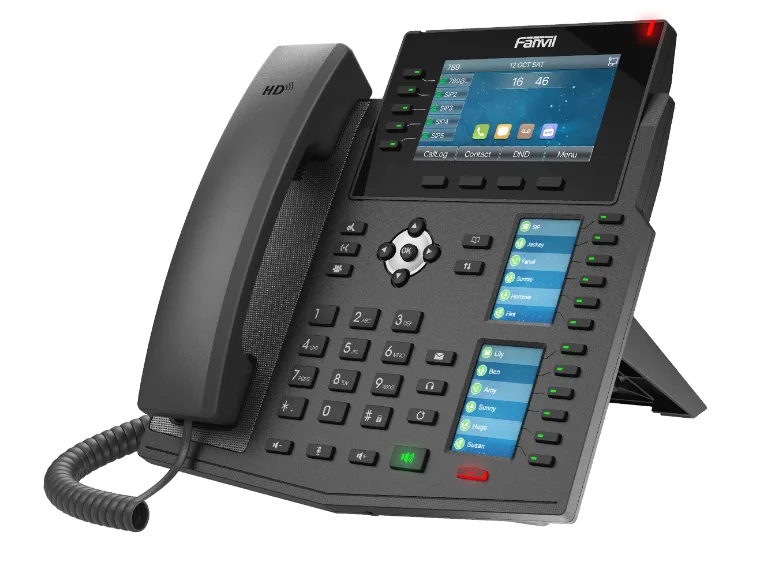
Cannon VoIP desk phone

Yes, there's a Linux app.

Most business phone providers stop at Windows and Mac, and others leave Linux users to unofficial workarounds. Our Linux desktop app is built and supported by us, like every other Cannon VoIP app.

Linux download
Get the app

Download for any platform.

Web

Nothing to install. Sign in from any modern browser and take calls in a tab that rings, flashes its title and shows a notification you can click to answer.

Open web app

iPhone & iPad

Every feature of the Android app, on iPhone and iPad: rings on a locked phone even when the app is closed, and keeps calls connected as you move between Wi-Fi and cellular. Team chat, texting and your CRM card come along too.

Android

Rings on a locked phone even when the app is closed or swiped away, and keeps calls connected as you move between Wi-Fi and cellular. Team chat, texting and your CRM card come along too.

Download for Android

Windows

The full portal and the phone together, running in the system tray when the window is closed. Perfect for headset-based agents.

Download for Windows

Mac

Native macOS desktop app with call controls right from your menu bar.

Linux

The Cannon VoIP desktop app for Linux. Sign in with your extension and make and take calls right from your Linux desktop.

Download for Linux

Desk Phones

Prefer hardware? Use our VoIP-6 desk phone or any device on our supported list.

See supported phones
A look inside

The mobile app, screen by screen.

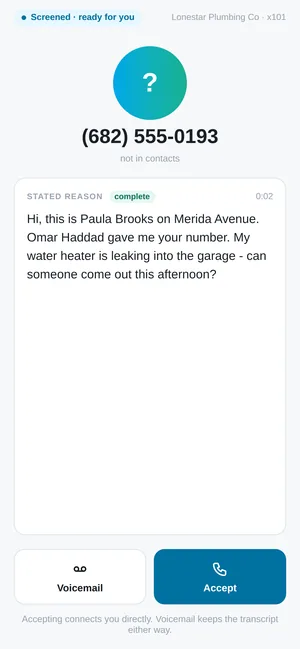
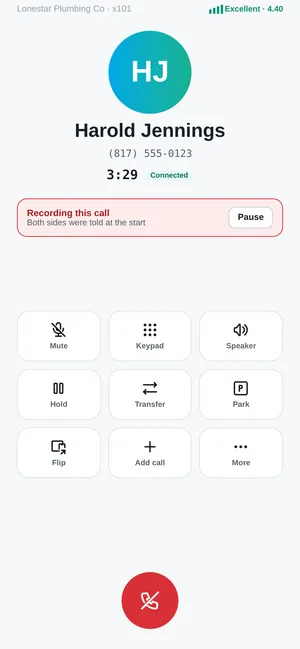
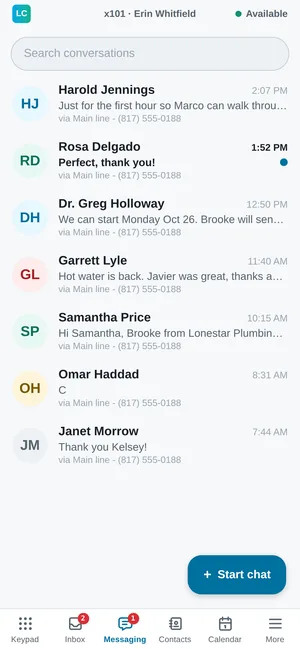
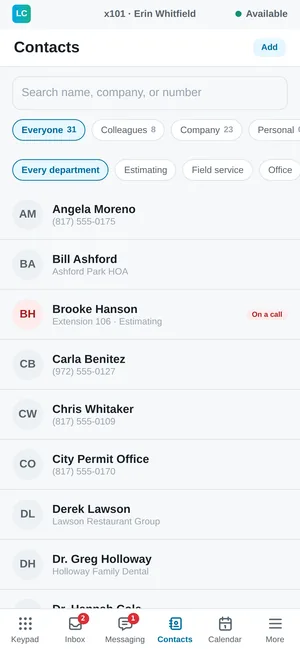
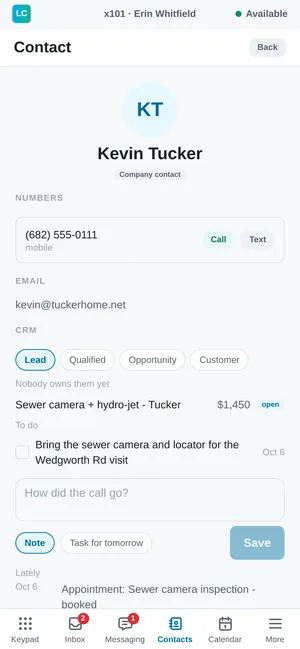
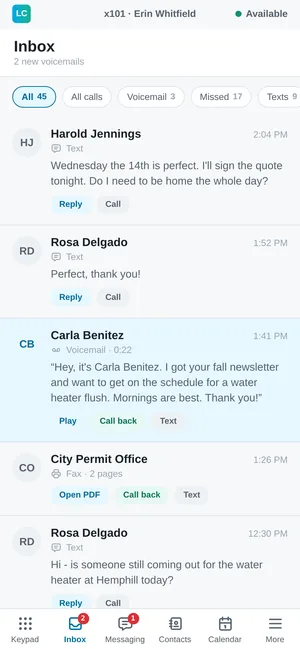
Dial, check your inbox, screen callers, text customers, find a colleague and see a contact's CRM card, all from one app.
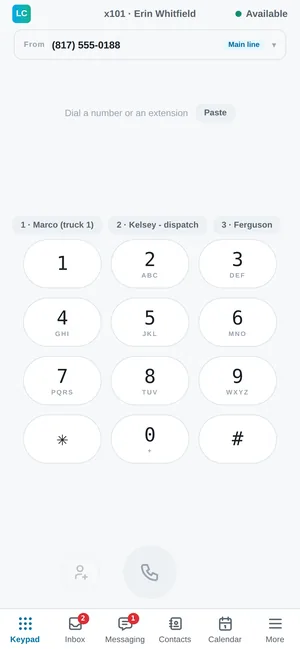
Cannon VoIP app keypad with speed dials
Keypad
Cannon VoIP app inbox with voicemail, missed calls, texts and faxes
Inbox
Cannon VoIP app showing a screened caller with a live transcript
Call screening
Cannon VoIP app in-call screen with call controls
On a call
Cannon VoIP app business text messages
Messages
Cannon VoIP app contacts with colleague status
Contacts
Cannon VoIP app CRM card with deal stage, owner, tasks and recent activity
CRM card
What's new in the apps

Built to ring, and keep ringing.

Android app

Rings on a locked phone
Full-screen incoming calls with Answer and Decline, even when the app is closed or swiped away.
Wi-Fi to cellular handoff
On weak Wi-Fi, a call moves to cellular before it breaks up, so the call stays connected.
Call quality meter
A plain word and a score on every call, plus a warning when audio drops out.
Flip a call to another device
Move a live call to your desk phone or your mobile without dropping it.
Battery settings check
Checks the battery settings that can stop calls ringing, and fixes them with one tap.
Dark mode
Follows your phone's light or dark mode, with Default, Large and Extra large text sizes.
CRM card
See a contact's stage, owner, deals, tasks and recent activity from the built-in CRM, and add notes or tasks.
Team chat
Channels and direct messages with coworkers, with replies, reactions, read receipts and pictures.
Texting that feels familiar
Business texting looks and works like your phone's own messages app.
Help is one tap away
Tap the logo for your support code, live help and who to call, or dial 611 to reach support.

Windows app and browser phone

Lives in the system tray
Closing the window keeps the phone running in the system tray, and it starts with Windows.
Windows notifications
Alerts for incoming calls, missed calls, voicemail and texts.
Listen, whisper and barge
Supervisors can listen in, coach the agent, or join the call right from the app.
Browser phone, nothing to install
Runs in a browser tab that rings, flashes its title and shows a notification you can click to answer.

In every app

Network check
Measures latency, jitter and packet loss, and detects double NAT, even before you sign in.
Live Help
Share your screen with support using a spoken code. Your helper can point but never press.
Translate button
Tap Translate on a call to bring in a live interpreter. It says it has joined, then translates each side for the other.
911 knows where you are
911 calls from the mobile app send the phone's location, or the account address when there is no location fix. The apps show the address and callback number a 911 call would send right now.
Every device keeps ringing
Your mobile app still rings when the browser phone is open, and declining a call on one device leaves your other phones ringing.
Contacts reach your desk phone
Contacts you save in the mobile app reach your desk phone's directory and stay current.
One app, everything you need

Everything, in sync, everywhere.

Calls & extensions
Make and receive on your business number from any device.
SMS & MMS
Business texting that stays synced across desktop and mobile.
Voicemail & transcription
Every voicemail is transcribed, with a one-line summary of what the caller wants.
Company directory
Reach any teammate and transfer calls with a tap.
Call history
A unified log of every call across all your devices.
Always in sync
Start on desktop, finish on mobile, your session follows you.

Get set up in minutes.

Download the app or ask us which desk phone is right for your team.

Download the app Talk to us