
We built these tools because our customers asked for them. Whether you're porting numbers, setting up a new location, or wondering why your calls aren't getting answered, these utilities give you real answers fast, no support ticket required.
Know exactly what you're porting, before you port it
Thinking about bringing your existing numbers over to Cannon VoIP? Before you submit a port request, it helps to know exactly what you're working with.
Our Number Lookup tool lets you paste in a single number or an entire list and instantly pull the carrier, caller name (CNAM), city and state, line type, OCN, and whether the number is portable, along with an estimated timeline for how long the port will take. Enter numbers in almost any format, as a range, or upload a .txt or .csv file for a large batch. Results export back out to .csv or .txt so you can share them with your team or keep them on file.
The tool runs up to 50 lookups per day, which is more than enough for most businesses evaluating a move to Cannon VoIP. One thing to keep in mind: port timelines shown are estimates, the losing carrier sets the final date, and that can shift. But knowing what to expect upfront makes the whole process a lot smoother.
Look up a numberTest your network before you deploy, and when calls go wrong
Call quality problems almost always start at the network level. Before you roll out desk phones, softphone apps, or web-based calling at any location, run our VoIP Network Readiness checker from that exact location first.
The test checks your public IP, your ISP, and SIP connectivity, then produces a readiness score with a clear pass/fail breakdown for each component. It takes just a few minutes and can save you hours of troubleshooting down the road. It's also the first thing we recommend running when you're chasing down an existing call-quality issue, download the report and send it to your IT team or to Cannon VoIP support, and it gives us everything we need to diagnose the problem quickly.
For the most thorough results: to run the full SIP port test, save the page and open it locally rather than running it directly in the browser.
Find out what your calls actually carry
Even if your calls are going out clean, there's a good chance you don't know what they carry when they leave your carrier: what level of trust they're assigned (STIR/SHAKEN attestation), how your caller ID actually arrives, whether you've been labelled "spam likely," or whether your equipment is really asking for HD audio. One call to our free test line answers all of it, no signup, no login, no cost.
Call attestation & branded calling test line
(817) 973-1573
Ring it from the line you're testing. The call is answered immediately and the result is read back aloud: every field, twice, at a deliberately slowed pace so an OCN or a ten-digit number can be written down from one hearing, then the line hangs up on its own.
For the full detail, down to the raw SIP signalling, go to voip.cannonvoip.com/branded-test and enter the number you called from.
A, Fully verified
Carriers treat it as trusted; you get the best answer rates.
B / C, Partially verified
Your caller ID is only partly verified, which can affect how calls display or rank.
None, Unverified
Your call is unverified, putting it at risk of being flagged as spam or blocked before it ever reaches the person you're calling.
What one call tells you
- The signature: attestation level (A, B or C, in plain terms), the verification result (the verstat value, so you know the number was validated against the signature rather than merely signed), and the origination ID, the identifier a carrier asks for first in a dispute.
- Caller identity: your caller ID exactly as it arrived, compared against the CNAM registered to the number, flagged when they differ, a common and otherwise invisible cause of calls displaying wrongly, plus whether the call was labelled "spam likely" against aggregated spam reporting.
- The number registry record: carrier and OCN, line type, rate centre and state, LATA and LRN, SPID, whether the number has ported before (with the date), whether it's portable now (with the reason when it isn't), and fast-port eligibility.
- Audio: whether a wideband codec such as Opus, G.722 or AMR-WB was offered, so you can confirm your equipment is actually asking for HD rather than assuming it, and the full codec list.
- The evidence underneath: the spoken readback kept word for word, the signalling presented as SIP with forwarded headers printed verbatim, and the raw call event.
It checks branded calling too
When your call carries a signed branded-calling token, the test line reads the branded name and logo out of it, fetches the logo image, and describes what's actually in the picture, so a broken, blank or out-of-date logo is obvious rather than looking like a logo that arrived correctly.
Two honest limits: no test line anywhere can show what a handset draws on screen, that's rendered by the recipient's carrier and their analytics partner. What this proves is the layer below, the actionable one: whether your call left properly signed and properly branded. If it did and a phone still shows nothing, the problem is at the receiving carrier, and this page is the evidence to take to them. And when the signed token doesn't reach the test line at all, it reports branded calling as not measured rather than absent, those are different findings.
Private by design: results are only shown to somebody who can enter the number the call was placed from. No browsing, no listing, no directory: the number is submitted by form, never in the web address, and every result is deleted after four hours. Anyone can request an entry be removed.
Use this line any time you want to confirm your numbers are landing at full A attestation, after a port, after a configuration change, after setting up branded calling, or any time call answer rates start to dip unexpectedly.
Confirm your fax setup is working
Not sure your fax machine (or your eFax address) is actually working? There's a free test line for that too, no signup required.
eFax test line
(817) 973-1575
Send any document to this number and watch it appear at voip.cannonvoip.com/test within a minute or two.
Since that test page is public, avoid faxing anything sensitive to it, faxes shown there expire automatically after 4 hours, and you can request removal of any fax at any time. For everyday faxing (not just testing), see our eFax guide for how to send and receive faxes from email or the eFax portal.
View the test pageTroubleshooting built into your phone system
Once you are a customer, more tools live right inside the apps and the portal.
- Network check in every app: measures latency, jitter and packet loss, and detects double NAT. It runs even before you sign in, so you can test a new location first.
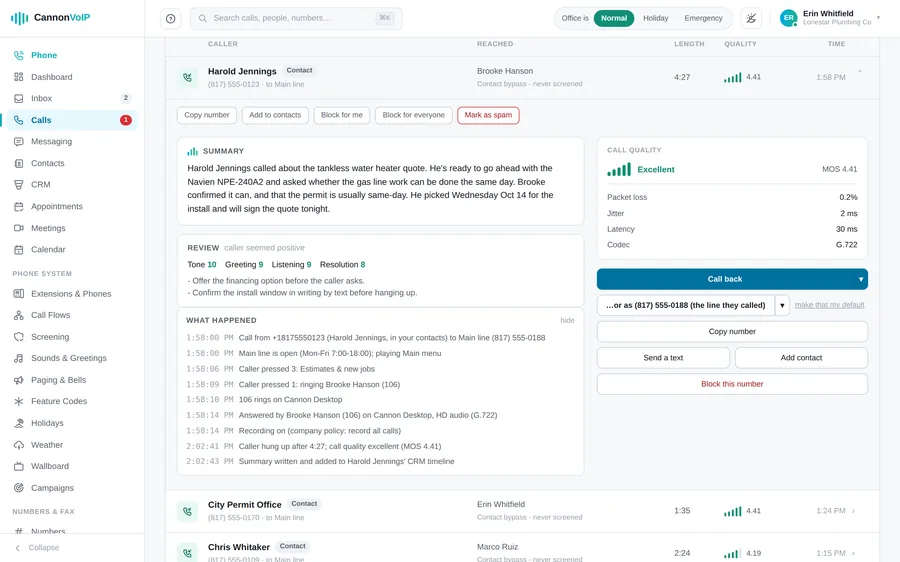
- A quality score on every call: each call gets a MOS quality score, with jitter, packet loss and latency saved. Desk phone calls are scored too, and calls with no measured audio show blank rather than a false perfect score.
- "What happened" on every call: the call log explains, step by step, where each call went and why: which phones rang, for how long, who answered, and which side hung up first.
- Desk phone Diagnose: one click gives a one-line verdict on what is wrong with a phone, checking the extension, configuration, registration and setup in order, each with a plain next step.
- Public status page: it does not depend on the portal app, so it loads even when the portal is down, and it has a machine-readable feed.
- Live Help: support can see your portal screen or share your app screen using a spoken code. Your helper can point but never click, password fields are masked, only one helper can join your screen at a time, and every session is logged.
- Dial 611: from any phone on your account to reach support. The help menu at the top left of the portal, or a tap on the app logo, shows your support code, live help and who to call.
- Support tickets: open a ticket from the portal, with response targets by priority, from one hour for urgent issues.
These tools are free to use and available anytime. If something in your results raises a question, our team is always here to help you make sense of it.