

1058+ features. Every one of them live today.
- Ring any mix of desk phones, the Android app, the Windows app and a browser tab on the same extension
- Phone menus, ring groups, call queues, business hours and holiday schedules you can change yourself in minutes
- An AI receptionist that holds a real conversation in the caller's language, books appointments and takes messages
- Call screening that shows you, word for word, who is calling and why before you answer
- Business texting with carrier registration handled from the portal
- Video meetings with a permanent room link and dial-in from any phone
- Enhanced 911 with per-extension callback numbers, per-building addresses and instant alerts
- A built-in CRM with people, companies, deals, website forms, email sequences and automation, right beside your calls and texts
- Appointments booked from the portal, a public booking page or the AI receptionist, with confirmation and reminder texts
- Free, guided moves from other phone systems, including recovering the wording of your old phone menus
- Plain-English explanations of where every call went and why
Every line below is something you can see, press, hear or rely on. All of it is included for $34 per extension per month, except the optional add-ons listed at the end. See pricing for the details.
We built and run all of it ourselves: the apps, servers, switching, portal and CRM. Most feature requests ship in under four weeks. How we're built.
Calling
Extensions
- Extensions of 3 to 8 digits, with the length chosen per company
- Change the extension length later, with a renumbering preview before anything moves
- Rename or renumber any extension from the extensions list
- Public service numbers like 911, 933, 711 and 411 can never become extensions
- Full seats with apps and texting, or light seats for a desk phone only
- Every phone and app signed in to an extension rings together
- Ring time set per extension, anywhere from 1 second to 10 minutes
- New extensions start with a 12-second ring time
- New extensions get a spoken voicemail greeting automatically
- Turn voicemail off for an extension that should never take messages
- Callers are told politely when someone does not take voicemail
- A colleague's call that you decline, miss, or that reaches you on Do Not Disturb goes to your voicemail
- Pickup groups so teammates can answer each other's ringing calls
- Store a mobile number per extension for moving live calls to a cell phone
- See which phones are online right now, refreshed every 15 seconds
- A caller who dials a missing extension hears which number was not found
Making calls
- Choose each extension's outgoing number from your company's numbers
- Show the company name, the person's name, or a custom name
- Hide caller ID for an extension permanently, or per call with *67
- Every caller ID is checked against numbers you actually own
- Use an outside number you own as your caller ID once it is verified with the carrier
- Call customers back from the number they originally dialed
- Callback caller ID looks back 60 days of inbound calls
- Calling back from the call log places the call from your own extension
- Click to call from the portal: your phone rings first, then it dials the contact
- Set a specific outgoing number per contact on the contact card
- Named caller ID profiles for teams that call as different brands
- Calls to other companies on the platform stay on our network
- Incoming calls labeled Internal, Direct or International
- Service numbers like 711, 811 and 988 always go through, with or without a 9 first
- A misdialed extension is explained aloud, not a busy tone
- International calling switched on or off per company
- International rates shown by tier in the portal
- Desk phones read the country and per-minute price aloud before an international call
- The caller presses 1 to accept the rate; silence or any other key cancels
- Turn off the spoken price for teams that call abroad every day
- The apps show the country and rate on screen before dialing
- International calls appear on the monthly statement as their own line, with the top countries, at the rate you were told when you dialed
- The billing page shows this month's international total so far
- Company dial-in calling (DISA): call in, enter the company PIN, and dial out as the company
- The company dial-in PIN is 6 to 10 digits, and easy PINs like 123456 are refused
- Dial-in calls show the company's main number
- Recent dial-in activity is listed on the Feature Codes page
Star codes
- *72 then a number forwards all calls; *72 alone forwards to voicemail
- *73 turns call forwarding off
- *78 and *79 turn Do Not Disturb on and off
- *98 checks your voicemail
- *91 and *92 mark a queue agent ready or away
- *67 hides caller ID for one call; *82 shows it for one call
- *69 calls back your last caller; *66 redials the last number you called
- *97 blocks the last caller, with undo in the portal
- *60 speaks the date and time in your company's time zone
- *75, a slot from 1 to 9, then a number programs a speed dial
- *1 through *9 dial your speed dials
- *8 answers the longest-ringing call in your pickup group
- ** then an extension answers that desk's ringing call
- *80 then an extension opens a two-way intercom to that desk
- *84 brings a live interpreter onto the call
- 701 to 720 retrieve parked calls
- 911 and 933 always work, with or without a 9 first
- Every code can be renumbered or switched off per company
- Codes that would clash with an extension number are refused
- Every star code confirms out loud what it did
- 911 can never be saved as a speed dial
Hold, transfer, park and conference
- Hold and resume from the desk phone or the apps
- A desk phone's Hold key plays your company's hold music to the caller
- Blind transfer to an extension, outside number or park spot
- The desk phone's own Transfer key works for blind and attended transfers
- Attended transfer: talk to the person first, then hand over or cancel
- The caller hears hold music while you check with a colleague
- If the transfer target does not answer, the caller comes back to you
- A caller who hangs up during a transfer is never left connected to a ringing phone
- Flip a live call to another device or your mobile without dropping it
- The other person hears nothing while a call is flipped
- Park calls on 20 spots, 701 to 720, private to your company
- A parked call nobody collects rings back the person who parked it
- A caller who hangs up while parked is cleared from the park spot straight away
- Intercom refuses a desk that is on a call or on Do Not Disturb
- Conference rooms with their own dial-in number
- Conference PIN with three tries, plus a separate moderator PIN
- Participant caps per room, with a "conference is full" message
- Callers hear the room name as they join
- Recorded conference rooms, with the file kept on the call record
Voicemail drops for sales teams
- Record a voicemail message once, then drop it with one tap when an outbound call reaches a machine
- The recording plays into their voicemail while you move on to the next call
- Shared drops for the whole team, or personal drops for one rep
- Desk phone users can drop a voicemail onto the call they are on from the portal
Every call explains itself
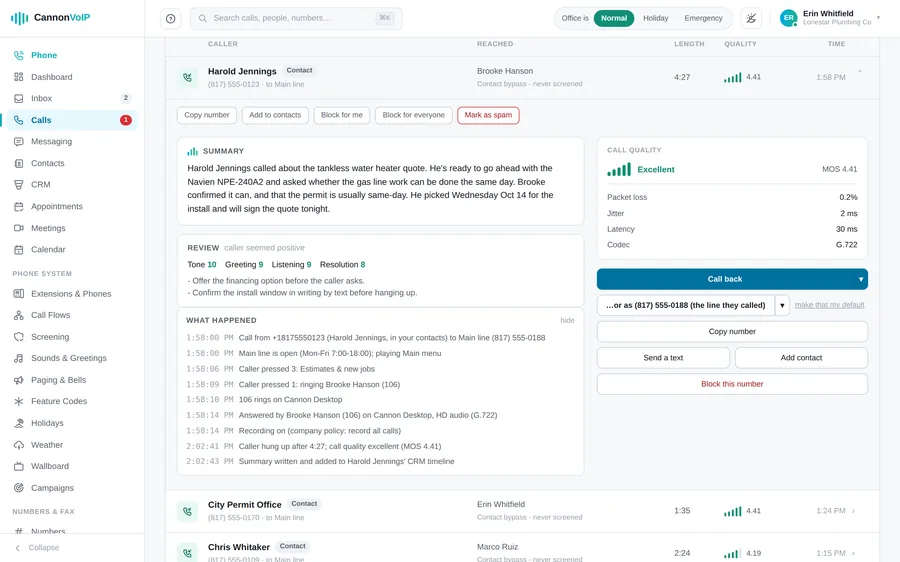
- A "What happened" panel on every call in the call log
- Step-by-step notes of where each call went and why
- Shows which phones rang, for how long, and who answered
- Notes when screening, blocks or caller timeout changed a call
- Notes which caller ID a forward used and why it might fail
- Notes when a greeting could not play or a message was discarded
- Notes which side hung up first on every connected call
- When one side hangs up, both sides of the call end, on every kind of call
Call routing
Where a call can go
- Ring an extension, including its desk phone and apps
- Send callers into a ring group or call queue
- Answer with a phone menu
- Hand the call to the AI receptionist
- Send callers straight to a personal or shared voicemail box
- Receive faxes on a number
- Forward to any outside phone number
- Send the call to your own on-site phone system over a SIP trunk
- Send the call to a meeting bridge
- Play a recorded message, then hang up
- Hang up without saying anything, answering first so carriers never report the line as broken
- Leave a number connected to nothing until it is needed
- The same destination choices on every call flow screen
- Forwarded callers can show the original caller's number, the dialed number, the original number with your company name, or one of your own numbers
- A warning explains when mobile carriers may refuse the original number
- An unanswered forward falls back to voicemail after 30 seconds
- Internet outage backup: forward calls when every phone on the account is offline
- Forwarding loops stop in voicemail instead of dead air
- A deleted destination sends callers to voicemail, never to silence
- An unrouted number plays a not-in-service message with a support number
- Distinctive ring pattern per phone number, including silent lamp-only
- HD voice per number when the other side supports it
- Missed-call text back, sent at most once a day per caller and never overnight
Phone menus
- Multi-level phone menus with submenus as deep as you need
- Menu keys of one to eight characters, including star and pound
- Department codes like 401 alongside single-digit choices
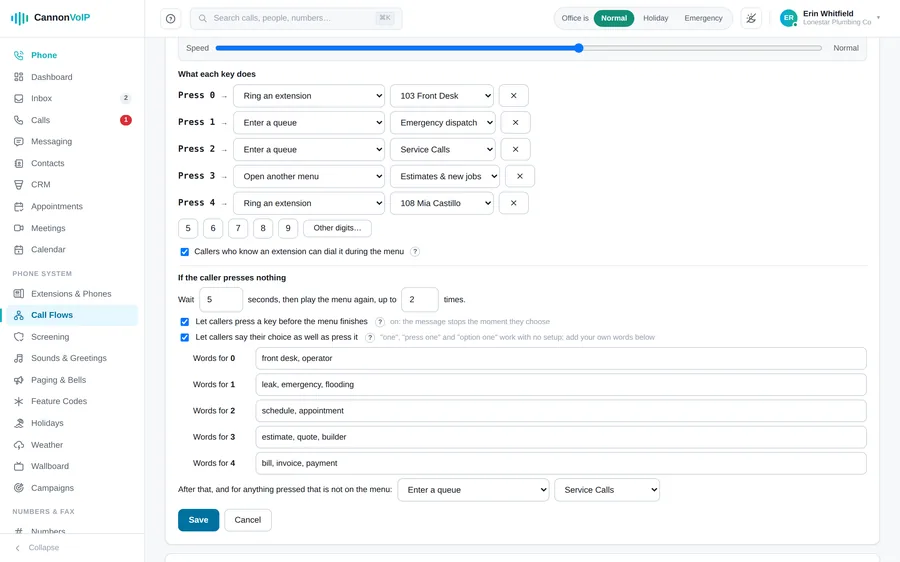
- Single-digit keys route the instant they are pressed
- The editor warns when a key will make callers pause briefly
- Callers can dial any extension directly during the menu
- Callers can press a key before the greeting finishes, or you can make the whole message play
- Callers can say their choice instead of pressing it, when enabled
- "One", "press one" and "option one" work with no setup
- Add up to 12 custom spoken words for each key
- The editor flags a spoken word assigned to two different keys
- Menu greeting read aloud from text, played from a recording, or generated by AI
- One-click AI greeting built from the menu's own options and names
- Choose the AI voice and speaking speed
- Set a menu's language, and its spoken options are written and voiced in that language
- A menu key can connect callers through a live interpreter, who joins when someone answers
- Optional transfer message played before the caller is connected
- Wait 2 to 30 seconds for a key press, and replay the menu 1 to 5 times
- Choose where callers go after no answer or an invalid key
- Invalid choices hear "Sorry, that isn't an option"
- A menu cannot be set to send callers back into itself
- A deleted menu sends callers to voicemail, never to silence
Business hours, holidays and company status
- Office hours per phone number, by day of week
- Hours use the account's time zone, not the browser's
- After-hours calls go to any destination you pick
- Company status switch in the portal header: Normal, Holiday, Emergency or Snow Day
- A banner across the portal shows when a special status is on
- Company status overrides office hours and normal routing
- Holiday calendar of named days the office is closed
- Add this year's US federal holidays in one click
- Automatic switch to Holiday on each listed day, and back afterward
- A manual status change on a holiday stands for that day
- Emergency and Snow Day always stay a manual choice
- A damaged schedule keeps the line ringing rather than closing it
Personal call rules
- Do Not Disturb sends calls straight to voicemail
- Forward all calls to an extension, outside number or voicemail
- Forward-all takes priority over Do Not Disturb and follow-me
- Follow me: ring your phones, then a colleague's extension or other numbers, step by step
- Pick the colleague's extension from a list, no numbers to remember
- Each follow-me step rings for anywhere from 1 second to 10 minutes
- After the last follow-me step, callers reach voicemail
- Personal office hours per extension, separate from company hours
- Presence forwarding for Away, At lunch, Business trip, Off work and Out of office
- Each status can ring as normal, go to voicemail, or go to another extension
- Caller rules for a specific number or a prefix like 214*
- Caller rules can always ring through, go to voicemail, or reject
- Caller rules are checked first and override hours and status
- Personal blocks send that caller to voicemail on your line only
Caller timeout for repeat callers
- Pauses a number that keeps calling the same person or group
- On for every company by default: the 5th call within 5 minutes starts a one-hour timeout
- Separate limits for extensions and for ring groups
- Set 2 to 50 calls within 1 to 120 minutes
- Timeouts last anywhere from 5 minutes to a full day
- Paused callers hear normal ringing, then reach voicemail
- Or play a polite message explaining the pause, then hang up
- Write your own timeout message, up to 400 characters
- The call log shows the timeout on the caller's latest call, with the reason and a live countdown
- Remove a timeout early with one button in the call log
- Exempt any phone number from caller timeout with one checkbox
- Hidden numbers never count toward a timeout
- Nothing is timed out for an hour after someone at the company dials 911
Voicemail
Greetings
- Personal voicemail on every extension
- Upload a greeting in any common audio format
- One-click AI greeting, or type your own words for the AI voice
- Choose the AI voice and speaking speed
- Record a greeting from your phone through the voicemail menu
- Go back to the standard greeting at any time
- Fill-in-the-blank greeting templates: company name, person, extension, direct number and email
- A company-wide greeting template, with per-extension overrides
- Preview what callers will hear before you save
- Hold music and ringing stop before your greeting plays, so callers hear it clearly
- Callers press pound, zero or star to cut the greeting short
- Optional "press 1 to speak with someone" before voicemail, ringing an extension or any number
Messages
- Messages record for up to three minutes
- Minimum message length per mailbox, from 0 to 30 seconds
- Messages under two seconds are discarded by default, and noted on the call
- Keep messages 1 to 365 days, or forever
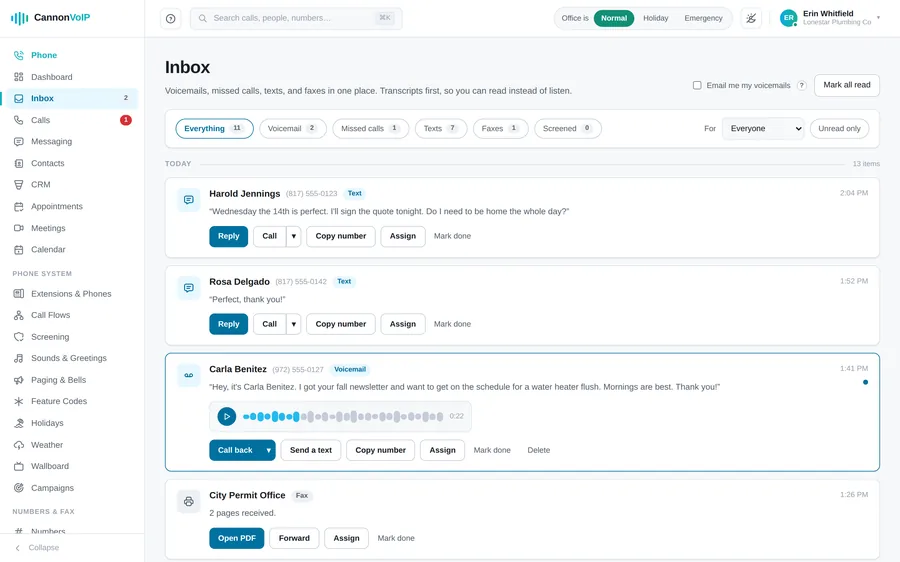
- Every voicemail is transcribed
- A one-line AI summary of what the caller wants
- Silent or empty voicemails are labeled "No message was left"
- Email each voicemail with the summary, transcript and audio attached
- Send voicemail email to up to ten addresses
- Play, read, call back or text from the apps, the portal inbox and the dashboard
- Unheard voicemails are counted on the sidebar and app tabs
- A voicemail under a legal hold cannot be deleted, and every deletion is logged
Checking voicemail
- Dial *98 from your own phone to hear new messages first
- Press 7 to erase, 9 to save, pound for the next message
- Optionally hear when each message arrived
- Mailbox PIN of 4 to 8 digits, set in the portal next to the extension's other settings
- Check voicemail from anywhere: call your own number and press star during your greeting
- Outside access is off until you turn it on, and needs a PIN of 6 to 8 digits
- Easy PINs like 123456, repeated digits or the extension number are refused
- Repeated wrong PINs lock outside access for an hour
- Star only works during the greeting, never while a caller is leaving a message
Shared voicemail boxes
- Shared boxes for teams like Sales or Support
- Shared box greetings say the box name out loud
- Every member gets an email for each message, with the box named in the subject
- Send a shared box's messages to its own email addresses as well, with the transcript
- A new message lights the message light on every member's desk phone
- Members hear shared box messages on *98
- A message one member hears is marked heard for everyone, or each member keeps their own, set per box
- See unheard message counts for each shared box
- Point numbers, menu keys or queue overflow at a shared box
- Queue callers can press 0 to leave a message instead of waiting
Paging, intercom and bells
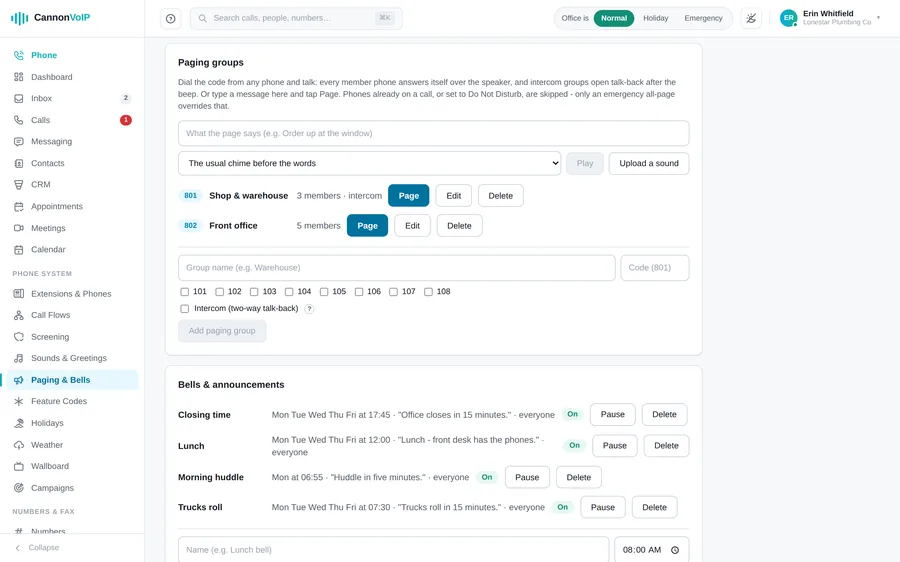
Overhead paging
- Paging groups, each with its own dial code
- Dial the group code and talk; member phones answer on speaker
- One-way pages mute every listener so only the person paging is heard
- Intercom paging groups allow two-way talk-back
- Add or remove group members and rename groups at any time
- Put a paging group on a desk phone key for one-touch paging
- Phones on a call or on Do Not Disturb are skipped
- Page everyone at once (All Call) from the portal
- Type a message in the portal and have it spoken over a group or the whole building
- Play a bell in front of a typed page to get attention
- Emergency pages break through Do Not Disturb and are logged
- *80 then an extension opens a two-way intercom to one desk
- Desk phones can auto-answer intercom calls after a set delay
Bells and scheduled announcements
- Schedule bells and announcements by time of day and day of week
- Shift-change bells, lunch bells, closing-time reminders and more
- Choose from built-in bells and chimes, or upload your own sounds
- Add spoken words after a bell, or play spoken words alone
- Send each bell to the whole building or one paging group
- Every sound is checked to belong to your account before it plays
Weather alerts
- A Weather page with the National Weather Service forecast for your building
- Use the company address, one of your buildings, or any spot you choose
- Severe weather warnings for that spot reach everyone: an alert on the apps' lock screen and a line on desk phones
- The most serious warnings, like a tornado warning, can be read aloud over a paging group you choose
- Choose how severe a warning must be before it raises an alert
Wake-up and reminder calls
- Schedule wake-up or reminder calls to an extension
- Useful for hotels, dormitories, shift workers and on-call staff
Call screening, spam and blocking
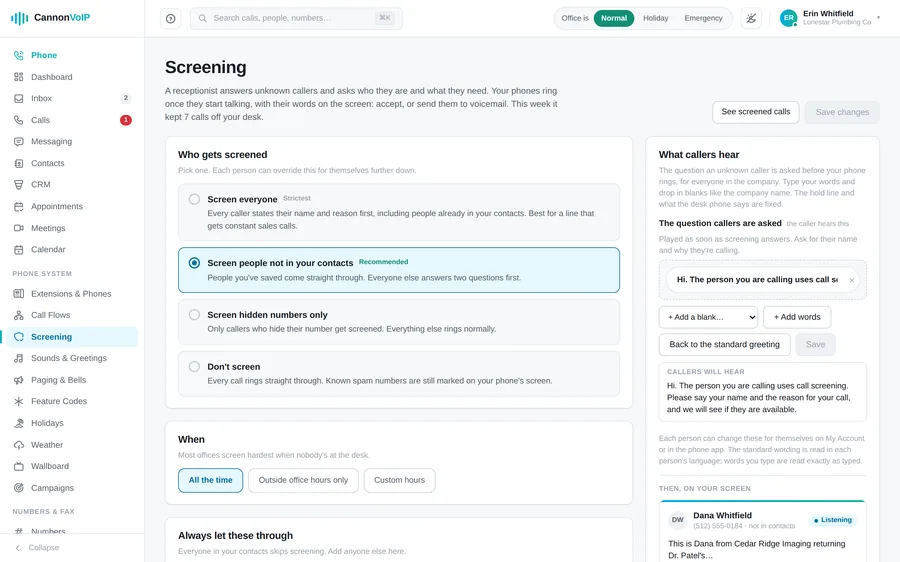
Call screening
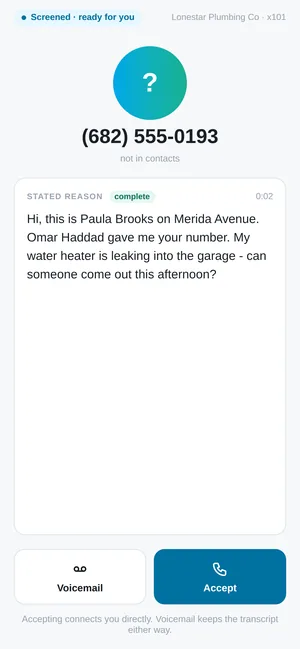
- Screened callers state their name and reason before you decide whether to talk
- Your phone rings as soon as the caller starts speaking
- Their words appear on your app and browser phone as they speak
- A caller who says nothing goes to voicemail without ringing anyone
- Screening stops listening as soon as the caller finishes speaking, so nobody waits in silence
- Tap Accept to connect at once, or Voicemail; doing nothing also ends in voicemail
- Connecting waits until you have actually answered, so the caller never lands on a dead line
- Desk phones ring for screened calls too, and play the caller's own words from their first word
- On a desk phone, press 1 to accept or 2 for voicemail, then listen in and press 1 to pick up if you change your mind
- Callers hear your hold music while you decide
- Sending to voicemail keeps the screening transcript with the message
- Shows whether a screened caller is already in your contacts
- Screen everyone, only non-contacts, only hidden numbers, or nobody
- Per-person choices that override the company default
- AI screening rules: describe the calls you never want, or tick reasons like sales, debt collectors, surveys, recorded messages or likely scams
- With AI rules on, a caller who fails them goes to voicemail without your phone ringing
- The call log says which rule sent a caller to voicemail and why
- If the AI check is unsure or slow, your phone rings
- Screening schedules by day, hour and time zone
- Edit the question screened callers are asked, per person and for the company, with fill-in blanks like the company name
- A saved list of callers who always skip screening
- Set any contact to always be screened, never be screened, or go straight to voicemail
- Saved contacts ring straight through
- Contacts added through a website form or chat skip screening only when the network vouches for the caller's number
- New accounts with no contacts yet are not screened into silence
- Block a screened caller company-wide in one click from the call log
Caller verification for suspect calls
- Callers the network has flagged can be asked four questions before ringing
- They give their name, company, reason, and how they got your number
- Their answers show on screen when your phone rings
- A caller who answers all four is trusted at your company for 30 days
- If speech services are unavailable, the call rings with a spam warning instead
Spam handling
- Per-number spam handling: warn, screen, turn away, or ignore
- Spam means a failed identity check, not just an unknown caller
- Flagged calls ring with "Possible spam" at the start of the name
- From the call log: copy, add contact, block, or mark as spam
- Marking spam blocks company-wide; unmarking undoes it
- Numbers reported by several unrelated customers are reviewed by a person
- Every network-wide listing is decided by a person, with a written reason
- Numbers customers have called or saved are never proposed for listing
- Old reports stop counting, and listings ease off automatically over time
- Network-blocked callers hear where to send an appeal, without hearing the business they called
- An appeal pauses the block immediately
Blocking
- Block a number just for you or for the whole company
- Personal block lists stay private
- Blocks can expire after a set number of days
- Import and export block lists as spreadsheets
- *97 blocks the last caller from any phone
- Calls showing invalid or unassigned numbers are refused automatically
- Calls pretending to be one of your receive-only numbers are refused
- All blocks and filters step aside after someone dials 911, so a callback always rings through
AI features
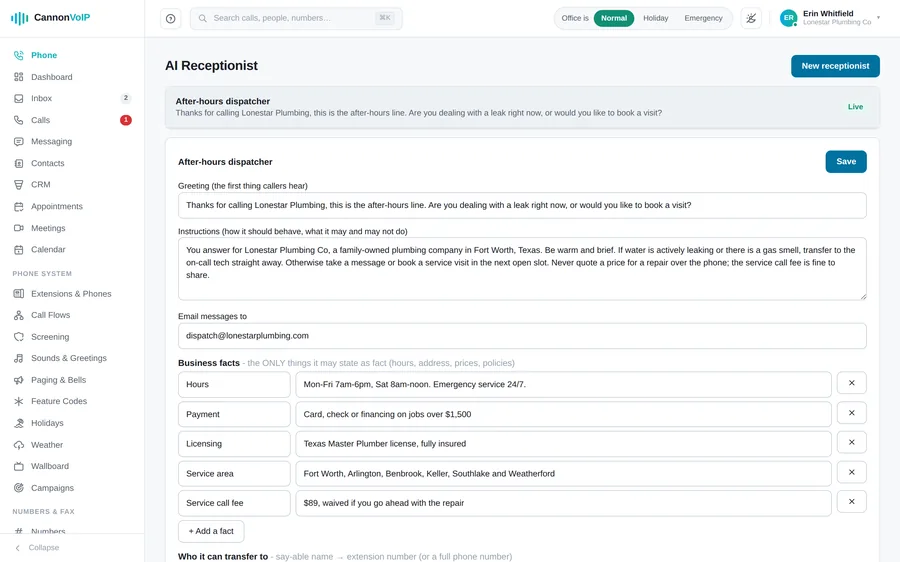
AI receptionist
- Answers calls and holds a natural, two-way conversation
- Write the greeting callers hear first
- Give it plain instructions on how to behave
- List the facts it may state, like hours, address and prices
- Paste your website, FAQ or price list for it to answer from
- Answers only from what you gave it and never invents details
- Offers to take a message when it does not know the answer
- Transfers callers by name to people or departments, or to an outside number
- Takes a message rather than guessing at a name you did not list
- Messages are saved in the portal and emailed to you
- Every handled call is emailed with the full conversation
- Greets callers by name when they are already in your contacts
- Hears callers who start talking over the greeting
- Stays with the caller for the whole conversation, however long it runs
- Speaks 19 languages, including English, Spanish, French, German, Portuguese, Vietnamese and Mandarin
- Switches to the caller's language on its own as soon as it hears them
- Pick from eight professional voices, or use your own custom voice
- Hands off to a person after two, three or five confused replies
- Long conversations wrap up by taking a message for follow-up
- Hangs up on obvious robocalls, with a switch to turn that off
- Sends callers to voicemail, never dead air, if AI is ever unavailable
- Unknown callers are rate limited so nobody can run up your bill; saved contacts never are
- Try it by typing, using your real settings, with no real actions taken
- Point any phone number, menu key or after-hours route at a receptionist
Appointment booking and texting
- Books appointments while the caller is still on the line
- Offers only times that are actually free
- Set what is booked, how long it takes, and the gap after
- Set the soonest a caller may book and how far ahead
- Cap how many appointments it books per day
- Finds another time if a slot is taken mid-call
- Sends an appointment email the moment a booking is made
- See booked appointments and the next open times in the portal
- With the built-in CRM on, its bookings land on the Appointments page and get the same confirmation and reminder texts
- Can text callers an address, link or confirmation from the number you choose
- By default, only texts callers whose number the carrier verified, at most three texts a day
Live interpreter
- Dial *84 for a live phone interpreter
- Or tap Translate on a call in the apps, or press a Translate key on a desk phone
- Use it on speakerphone between two people in the same room
- Or conference it into a call already in progress
- Says it has joined, so both people know, then translates each side for the other
- Works out both languages itself, with nothing to set up
- Waits for a natural pause before translating
- Never speaks except to translate, and never translates its own voice
- Sessions run for up to two hours
AI across the system
- Voicemails arrive with a transcript and a one-line summary
- Call summaries in the call history
- AI-generated menu, queue and voicemail greetings in a choice of voices
- Translate any text message with a long-press, keeping the original visible
- Ask the help center a question and get numbered steps with cited articles
- AI settings show this month's AI use, against any monthly limit on your account
- Partners' customers see the partner's brand name on AI features
Connect your own AI assistant
- Connect Claude, Gemini, ChatGPT or any Model Context Protocol assistant
- One connection address on your own portal domain
- Choose which areas of your account an assistant can reach, or hand-pick its tools
- Set how far it acts alone: read only, low-risk actions, or approved high-risk actions
- High-risk actions wait for a person to approve by push notification, team chat or email
- Approve or deny waiting actions from the portal; unanswered requests expire after an hour
- An assistant can never outrank the person who connected it
- Every assistant action is logged under the assistant's name
- Assistants can read calls, voicemails, texts, contacts and tickets
- Assistants can check live calls, parked calls, the wallboard and today's dashboard
- Assistants can reply to and schedule texts, create tickets and meetings, transfer live calls and block numbers
- Company status changes and bulk texts always need a person's approval
- Opt-outs and permissions apply to assistants just as they do to people
Mobile, desktop and browser apps
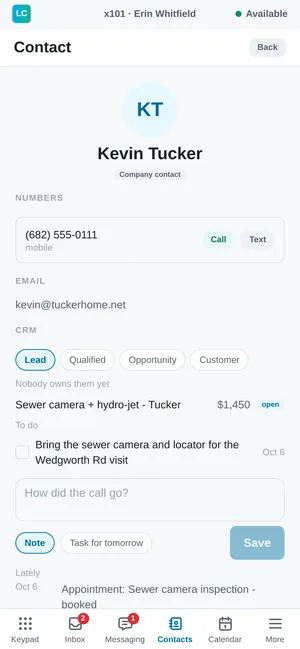
Signing in
- Sign in with your work email and password
- Or with a one-time code from your welcome email
- Scan the sign-in QR code with your phone's camera, or upload a picture of it
- Sign-in links in the welcome email open the Android app directly
- Continue with Google or Microsoft when turned on for your account
- Reset a forgotten password from the app's sign-in screen
- Opening the phone from the portal signs you in automatically
- Opening the app with no signal keeps you signed in
- Signing out ends the session on the server and stops a lost phone ringing for your calls
Dialing
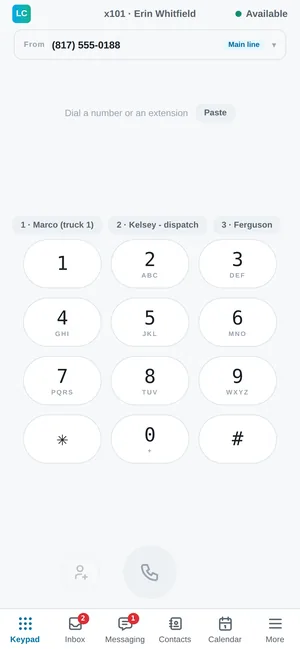
- Full dial pad with letters under each number
- Hold zero for a plus sign on international numbers
- Paste a number and any surrounding words are removed
- Choose which company number the person you call will see, shown with its label
- A matching contact or extension appears while you type
- Save a dialed number to contacts with the plus button
- Speed dial buttons above the keypad
- Expensive international calls ask you to accept the per-minute price first
- Tap a phone link in any other Android app to call through Cannon VoIP
On a call
- Large caller name and photo, with the business line and extension the call came in on
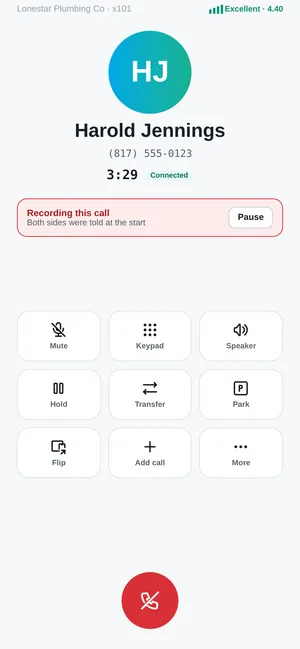
- A call quality meter with a plain word and a score
- A plain warning when audio is dropping out or badly delayed
- Mute, hold and resume from large buttons
- Every new call starts unmuted
- In-call keypad for phone menus and PINs, showing the digits sent
- Transfer by choosing Ask first or Send straight over
- The transfer list shows each colleague's status, like On a call
- Tells you when a transfer fails and the caller is back with you
- Park a call in a slot anyone in the office can pick up
- Flip a live call to your desk phone or your mobile without dropping it
- Add a call puts the first on hold and opens the dialer
- Held calls stay pinned above the tabs; tap to resume
- A banner shows while a call is being recorded
- Pause and resume recording while a card number is read out
- Switch between earpiece, speaker and Bluetooth; long-press for any audio route
- A connected headset takes over the call audio automatically
- Audio reconnects on its own after a brief network drop
- Moving between Wi-Fi and cellular keeps the call connected
- If your connection drops, the other person hears "please hold" rather than silence
- If the app does not come back within 20 seconds, the call ends cleanly instead of leaving a silent line
Incoming calls and the inbox
- Full-screen incoming call with Answer and Decline, even on a locked phone
- Contact and company names show on incoming calls
- Your mobile app still rings when you also have the browser phone open
- Declining a call on one device leaves your other phones ringing
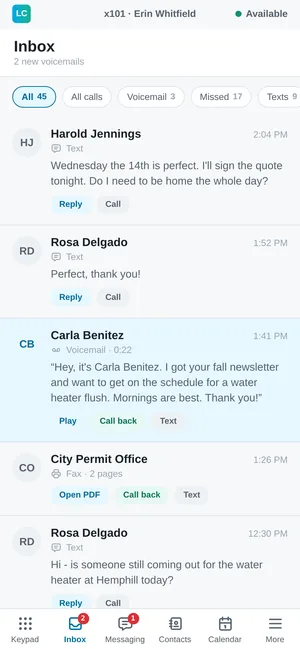
- One inbox for voicemail, missed calls, texts and faxes, with a count for each
- Calls turned away by screening get their own filter
- Full call history of incoming, outgoing and internal calls
- Search call history by name, number, transcript or summary
- See which queue or menu a missed call came through
- Read voicemail transcripts in the list, or play them with a progress bar
- Call back or text from any inbox item
- Build your voicemail greeting from your own words right in the app
Contacts and presence
- One directory of colleagues, company contacts and personal contacts
- Search by name, company, or the last few digits of a number
- Filter colleagues by department or building
- Colleagues show live status like At lunch or On a call, or Offline
- Personal contacts only you can see
- Choose which of your numbers a contact always sees
- Copy your phone's contacts or your Google contacts into your personal list
- Contacts you save in the mobile app reach your desk phone's directory and stay current
- Upload a profile photo, resized and stripped of location data
- Seven statuses including Away, At lunch and Do Not Disturb, changed from the top of every screen
- Personal speed dials on *1 to *9
Android app
- Rings on a locked phone, even when the app is closed or swiped away
- Works with Android's own calling system for audio and system controls
- Checks battery settings and fixes them with one tap
- Warns if Android could pause the app after months unused
- Shows microphone, notification and Bluetooth permissions at a glance
- The back button never exits or hangs up a live call
- Choose Wi-Fi or cellular as your preferred network for calls
- On weak Wi-Fi, moves a call to cellular before it breaks up, and back only once
- Text size choices of Default, Large and Extra large
- Follows your phone's light or dark mode
- Parked calls show above the tabs; tap to pick up
- Tap the logo for help: your support code, live help and who to call
- Contact support from the app by calling the support number, or dial 611
- Live Help shares your screen with support using a spoken code; your helper can point but never press
Windows desktop app and browser phone
- A browser phone that runs in a tab with nothing to install
- A Windows desktop app with the full portal and the phone together
- Closing the window keeps the phone running in the system tray
- Starts with Windows by default, and turning that off sticks
- Windows notifications for incoming calls, missed calls, voicemail and texts
- The browser phone rings, flashes the tab title and shows a notification you can click to answer
- A side panel shows caller details and recent contact history during a call
- Updates are signature-checked before they install
- Three-column layout with navigation, a list and call details
- Supervisors can listen, whisper or barge from the app
- Light and dark themes, remembered
- A USB headset unplugged mid-call hands over to another microphone
- Check your network connection before you even sign in
Desk phones
Supported phones
- Certified Cannon VoIP phones: VoIP-6 and VoIP-12 desk phones, the VoIP-1 phone and the VoIP-ATA-1 analog adapter
- Fanvil: X6U-V2, X210-V2, W610W, GA10, X5U, X7 and V65
- Yealink: T31P, T33G, T43U, T46U, T54W, T57W and the W73P cordless phone
- Grandstream: GRP2601, GRP2604, GRP2614, GXP2170, and the HT801 and HT802 adapters
- Snom: D713, D735 and D785
- Cisco MPP: 6841, 7841, 8841 and the ATA 191 adapter
- Poly VVX: 150, 250, 350 and 450
- Other models can be added with a configuration template
- Fax machines and analog phones connect through an on-site adapter
- Light seats for people who only need a desk phone
Setup with no typing
- Enroll a phone with its extension, model and MAC address, or assign the extension later
- Zero-touch setup: factory-fresh Fanvil, Yealink and Grandstream phones find the platform on first boot
- Snom, Cisco and Poly phones set up with a one-time link
- Each phone gets its own private provisioning link that works for that phone only
- MAC addresses accepted with colons, dashes or no separators
- Suggests the closest model name when one is mistyped
- Status badges for provisioned, waiting for first boot and online or offline
- Move a phone to a different extension without enrolling it again
- Phones only re-apply settings when something actually changed
- Download MAC lists as a spreadsheet
- Re-arm a phone after a factory reset or hardware swap
- Removing a phone resets it and stops it registering
- Rotate a phone's SIP password with one button; it picks up the new one on its next check-in
Company directory and keys
- The company directory downloads into every phone's phonebook
- The phonebook includes every extension, shared company contacts and the owner's personal contacts, including those saved in the mobile app
- Busy lamp keys light up when a colleague's phone is ringing, in use or on Do Not Disturb
- Press a busy lamp key to call that colleague or pick up their ringing call
- Speed dial keys for any extension or outside number
- Paging keys for one-touch paging to a group
- Up to twenty keys per extension, with custom labels
- Keys run from the side keys onto the bottom row, in order, and the editor shows where each lands
- Hide unused side keys so the phone shows only the keys you set
- Reorder keys with up and down arrows
- Keys belong to the person and follow them to any phone
- Keys pointing at a deleted extension are removed automatically
- The phone's own Transfer, Hold and Conference keys work as you would expect
Over ninety settings, set once or per phone
- Set defaults per phone model for all your phones, then override for one phone
- Each field shows whether it is set here or inherited, and from where
- Settings a brand does not support are clearly labeled
- Upload a boot logo and background image per phone model
- Upload a second background that VoIP-6 phones show when side keys are set
- Screensaver, clock, date and idle screen options
- Show or hide missed call, text, voicemail and Do Not Disturb icons
- Message waiting light and stutter dial tone for new voicemail
- Screen brightness and power saving
- Phone menu language: English, Spanish, French, German, Portuguese or Italian
- Ring tones and separate ring, handset, headset and speaker volumes
- Headset answer mode, key beep, and speaker or mute key lockout
- Call waiting controls
- Auto-answer with a delay, for intercoms and door stations
- Hotline phones that dial a set number when the handset lifts
- Emergency numbers stay dialable while the keypad is locked
- HD codec order including G.722 wideband
- Phone clock follows the account time zone, with 12 or 24-hour display
- DHCP or fixed IP, VLAN, PC port and traffic priority settings
- Wi-Fi network settings on phones that have Wi-Fi
- Keypad lock and settings menu code
- Every phone gets its own random web admin password
- Advanced configuration lines for anything not covered by a named setting
Diagnostics and remote control
- One-click Diagnose screen with a one-line verdict on what is wrong
- Checks in order: extension, configuration, registration and setup, each with a plain next step
- See when the phone last collected its settings, and whether it is registered
- See the phone's model, firmware, local IP and public IP
- Reprovision now: tell a phone to re-read its settings immediately
- Reboot a phone remotely, with a warning that calls will drop
- Upload firmware per phone model
- Adjustable check-in interval, from three minutes to one week
Hot desking
- Make any certified desk phone ring as your extension for the day
- The phone returns to its owner automatically when the claim ends
- Give it back early with one button
- Your keys and speed dials follow you to the borrowed phone
Managed office routers
- Plug-and-play office routers set up for voice and managed for you by our team
- Office Wi-Fi name and password set centrally
- Only approved devices can connect
- Routers switch off settings known to break phone calls, automatically
- Our team watches each router and can reboot it remotely
Business texting and branded messages
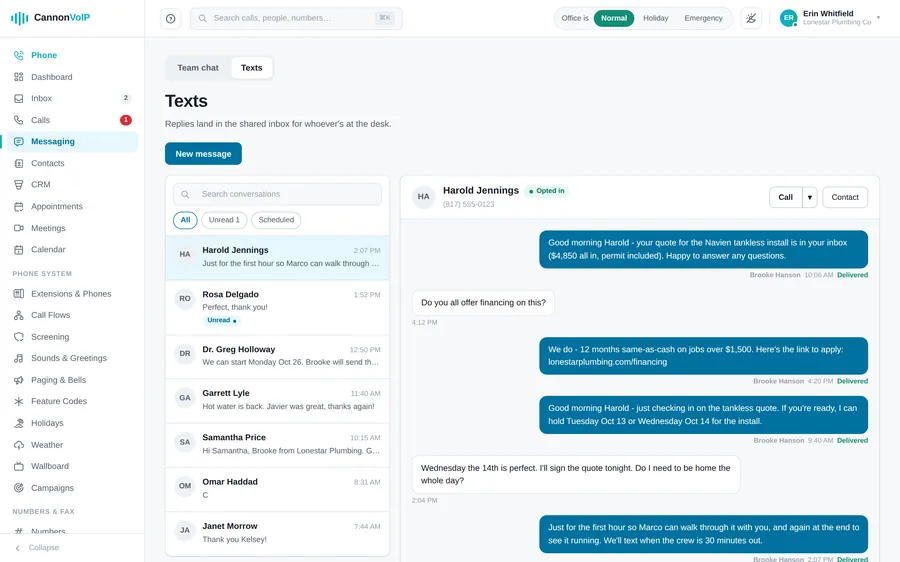
Texting from the apps
- Text customers from your business numbers in the apps and the portal
- On the Android app, texting looks and works like your phone's own messages app
- Texting appears in the apps once it is switched on and approved by the carriers
- Start a new text and pick the number it comes from
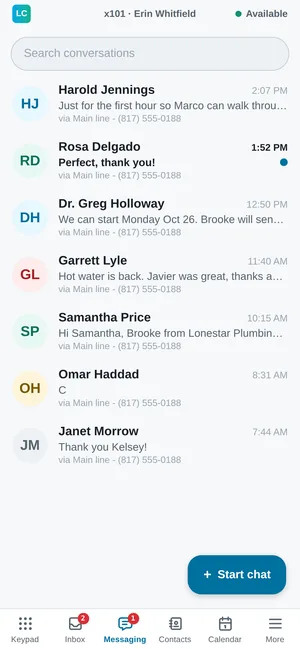
- Conversations show unread dots, contact names and the last message
- Opted-out conversations are marked and sending is blocked
- Ready-made templates, like appointment confirmation and balance due
- Schedule a text for in an hour, tomorrow, Monday morning, or an exact date and time
- Scheduled texts show in the thread with Edit, Send now and Cancel
- A scheduled text is dropped if the person opts out first
- Send pictures, resized automatically to fit carrier limits
- Pictures you receive are kept in your account, so they never vanish when a carrier link expires
- A character counter warns when one symbol makes a text cost more, and names the symbol
- Sent, delivered and failed status on each text
- Shows which teammate sent each outgoing text
- Long-press a message to translate it, with the original still visible
- Reply quoting an earlier message, forward a message, or share a contact
- Add a texter to your contacts from their message
Shared text inbox
- A shared text inbox the whole front desk works from
- A separate tab for each texting number
- Search conversations by name, number or message text
- Filter by All, Unread or Scheduled, with counts
- Opening a conversation clears it as unread for everyone
- Call a texter from the conversation in one click
- Choose who is notified when a text reaches each number
- Missed-call text back, set per number, up to 320 characters, at most once a day per caller
Bulk texting
- Send one message to a list from a company number
- Paste recipients one per line, with optional names
- Duplicates and invalid numbers are dropped automatically
- Campaigns start as drafts so you can review the count
- Start, pause, resume, cancel or delete a campaign
- Live progress shows sent, opted out, queued and skipped
- Sends in paced batches to stay within carrier limits
- Record the date your list agreed to hear from you
Compliance built in
- STOP, UNSUBSCRIBE or QUIT opt people out of every number your business texts from; START or UNSTOP opts them back in
- HELP replies get an automatic answer
- Opt-outs are checked before every single text is sent
- Register your business brand and texting campaign (10DLC) from the portal
- See brand and campaign approval status and refresh it any time
- Your numbers join the approved campaign automatically
- Every text from a local number, including missed-call text back and receptionist texts, waits for that approval, so nothing goes out that carriers would block
Branded Calling + RCS
- One add-on for both: your business name and logo on calls you make, and branded business texting
- Branded calls show your name, the reason for the call and your logo on supported phones
- Branded texts (RCS) arrive with your business name, logo and colour at the top
- Tappable buttons and read receipts on phones that support them
- Phones that cannot show RCS get a normal text message, automatically
- Guided setup in three steps: your brand, your messaging agent and launch
- Each step lists exactly what it is still missing, and saves as you go
- Add test phones to try your branded texts before launch
- Messages are included, with no per-message charges
- Plain texting keeps working the whole time your branded messaging is being verified
Cloud fax
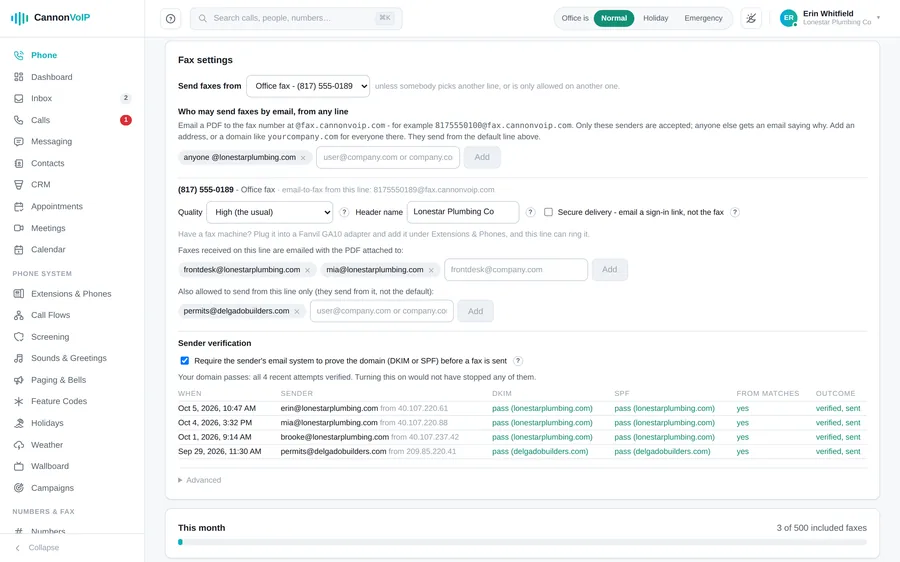
Cloud fax
- Send a fax from the portal: PDFs, pictures and scans, or Word, Excel and PowerPoint files
- Put several files in one fax, in the order you choose
- Send one fax to up to 20 numbers at once
- Add a cover sheet with the recipient's name, a subject and a note
- Send a fax later, and cancel one that has not gone out yet
- Email a document to send it as a fax, from addresses or domains you allow
- Optional sender check for email-to-fax: only mail that genuinely comes from the sender's domain is faxed
- The Fax settings show the last 10 email-to-fax attempts and whether each would have been refused
- A refused email-to-fax is answered with the reason
- Received faxes land in the same inbox as voicemail and texts
- Choose who each fax line emails received faxes to, with the PDF attached
- Secure delivery: received faxes are emailed as a sign-in link instead of an attachment
- Set each line's fax quality and the header name the receiving machine prints
- People who fax by email are told whether it was delivered or failed
- Open any fax as a PDF in one click
- History of sent and received faxes with page counts, search and filters
- Plain-English reasons when a fax fails
- A received fax with no readable document is tried again, then marked failed with the reason
- Faxes are kept for a year, or seven years if you choose, and legal holds keep them longer
- A monthly fax allowance with a usage meter, and faxing never stops at the limit
- Point any number at fax, or keep a fax machine through an on-site adapter
- Fax webhooks and a fax API for your own systems
Meetings, calendar and chat
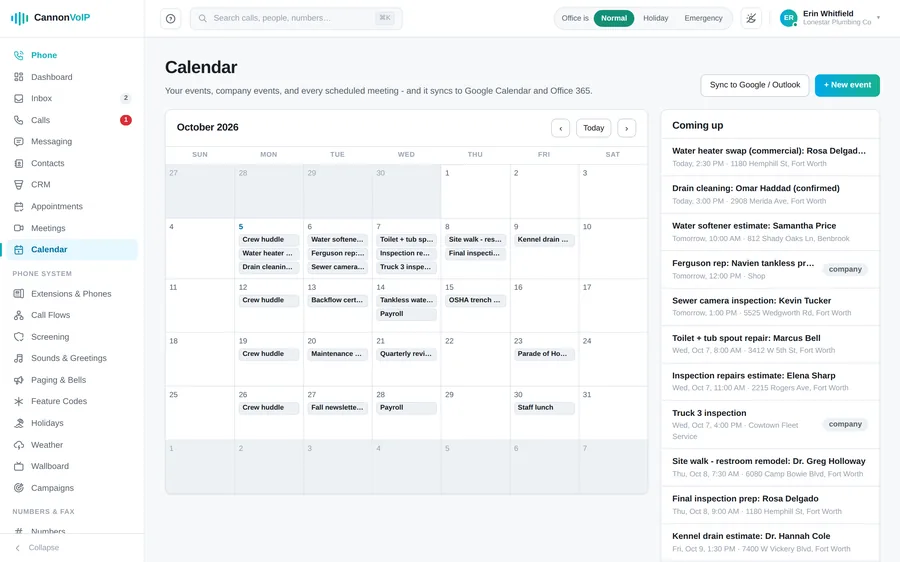
Video meetings
- Guests join from a browser or the app with no account
- Join by pasting a meeting link or typing the code
- Optional passcode on any meeting
- Waiting room where hosts admit or turn away each guest
- A permanent room link for your business that never changes
- Copy, email or text your room link
- Schedule a meeting with a title, start time and length
- Email invites include the join link and dial-in details
- One-click add to Google Calendar, Outlook, or a calendar file
- Dial in from any phone with a number and a 7-digit PIN
- Phone guests enter the meeting passcode and wait in the waiting room like everyone else
- Test your camera and microphone, with a level meter, before joining
- Join with audio only when there is no camera
- Share your screen, including its sound, and draw on it for everyone to see
- Blur your background in Chrome and Edge
- Switch microphone, camera and speaker during the meeting
- Pin anyone to the main view
- Record meetings, with a recording banner for everyone
- Play past recordings from the portal
- Hosts can mute or remove participants
- Meeting links open straight in the Android and Windows apps
- On a phone, a large speaker view with a strip of faces
Conference bridges
- Conference rooms anyone can dial into, with an optional PIN and moderator PIN
- Participant caps and recorded rooms
Calendar
- Built-in calendar with month view and agenda in the portal
- Calendar tab in the Android app
- Add events with location and notes, visible to you or everyone
- Add a video meeting with a Join button to any new event
- Appointments show on the calendar
- Google Calendar events join your meetings agenda
- Subscribe from Google Calendar, Outlook or Apple with a private link you can replace
Team chat
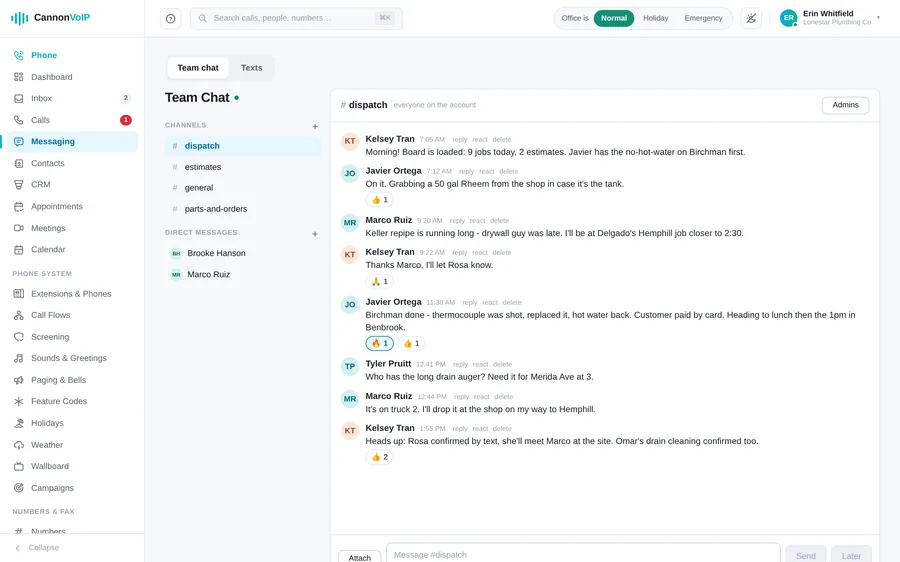
- Team channels and direct messages with coworkers
- Private channels only their members can see
- Channel roles: Admin, Member or View only
- Pick members when you create a channel, and add people later
- Reply to a message, react to it, and see who has read it, with typing dots while someone writes
- Attach files in the portal, and pictures from the Android app
- Write a message now and send it later
- New messages appear live, without refreshing
- Leave a channel, or remove your own messages
- Every channel has its own link you can share with a colleague
- Team chat on the Android app, with the same replies, reactions, read receipts and send later
- On a phone-sized browser, chat shows one pane at a time
- Team chat and texts share one Messaging tab in the portal and app
Website chat
- Add a chat bubble to your website with one line of code
- Works with Wix, WordPress, Squarespace or plain HTML
- Set the greeting visitors see first
- Pick which staff members answer website chats
- Choose the bubble's colour, title, size, corner shape and side, with a live preview
- See which page each visitor was on
- Reply from the portal or the Android app
- Visitors keep their conversation as they move between pages
- Website chats link to the visitor's record in the built-in CRM
- Rotate the website key to switch off old copies
Ring groups, queues and the contact center
Ring groups and call queues
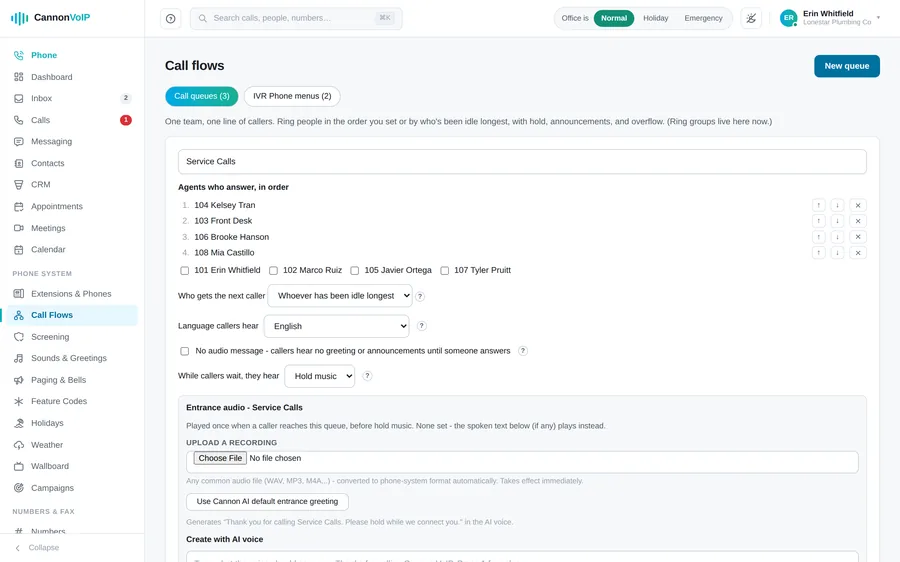
- Ring groups and call queues in one simple editor
- Choose who answers and set their order with up and down arrows
- Ring each person in order, or spread calls evenly to whoever has been idle longest
- Ring each person from 1 second to 10 minutes
- Callers wait from 1 to 120 minutes before overflow
- Send callers who waited too long to any destination, or to voicemail by default
- Cap how many callers can wait, from 1 to 200; the next caller goes straight to overflow
- Night mode: a queue can keep its own days, hours and closed destination
- Choose what waiting callers hear: hold music, ringing, or silence
- A quiet mode with no spoken messages, where callers hear only the waiting sound
- An entrance greeting played once, before the hold music starts
- Greetings can be typed text, an uploaded recording, or an AI voice that names the queue
- A group's or queue's spoken lines can be in another language
- Hold music per queue, or the company default
- Company hold music: a default track, one chosen track, or random from your uploads
- Hold music loops smoothly with a crossfade at the join
- Tell callers their place in line every 15 to 300 seconds, or switch announcements off
- Callers at the front hear "You're next in line"
- Callers can press 0 to leave a message instead of waiting, and are told so
- Offer a callback: callers press 3 and the team calls them back
- Repeat callers are offered first to the agent they spoke to last time
- A breather between calls for each agent, from 0 to 120 seconds
- An answer-time target per queue that feeds the wallboard's service level
- Choose whether every phone that rang keeps the call in its recent calls, or only the phone that answered
- Agents on Do Not Disturb are skipped automatically
- An agent who lets a call ring out is marked away
- *91 and *92 sign an agent in and out
- The ringing phone shows the queue name and the caller's number
- The person answering hears "Call from the Sales queue" before connecting
- A caller who hangs up while waiting leaves the queue immediately, and agents' phones stop ringing
- A queue cannot be deleted while a phone number still uses it
Wallboard and supervision
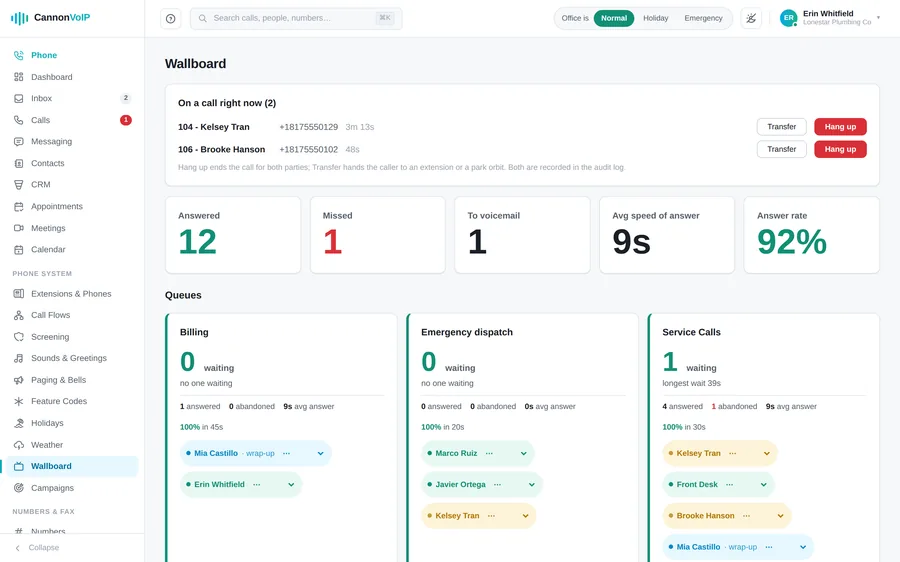
- A wallboard for a wall screen, refreshing every five seconds
- Each queue shows callers waiting and the longest wait
- Each queue shows today's answered, abandoned and service level
- See every agent as available, busy, wrap-up, away or offline
- Supervisors can listen, whisper or barge into live calls
- Transfer, park or end a live call from the wallboard
- Supervisor actions are logged with the person's name
Outbound campaigns and power dialer
- A power dialer for outbound campaigns, pacing calls to the agents who are free
- Paste leads one per line, with names; every skipped lead is reported with the reason
- Calls only go out between 8am and 9pm in the lead's own local time, and no setting can widen that
- A campaign with a missing or invalid calling window stops instead of dialing
- Opt-outs are permanent and checked both at import and at dial time
- Attempt caps and spacing between attempts
- Every call shows one of your real numbers
- The dialer never launches more calls than your available agents can take
- A campaign that abandons too many answered calls pauses itself
Post-call surveys
- Build short surveys with yes/no or 1 to 5 questions
- Callers answer on their keypad after the call
- See results per question, as percentages and averages
After-call AI
- Recorded calls are transcribed with each speaker's voice separated
- A short summary of every recorded call
- Search calls by what was said
- Optional coaching reviews: five scores and up to three notes per call
- Coaching themes roll up per person on Analytics, framed as coaching, not a league table
Reports and analytics
- Reports for calls by day, by extension, by department, by building and by outcome, plus a daily texting summary
- Run any report over any date range and download it as a spreadsheet or a PDF
- Email reports daily, weekly or monthly to several recipients
- Pause, resume or delete a scheduled report
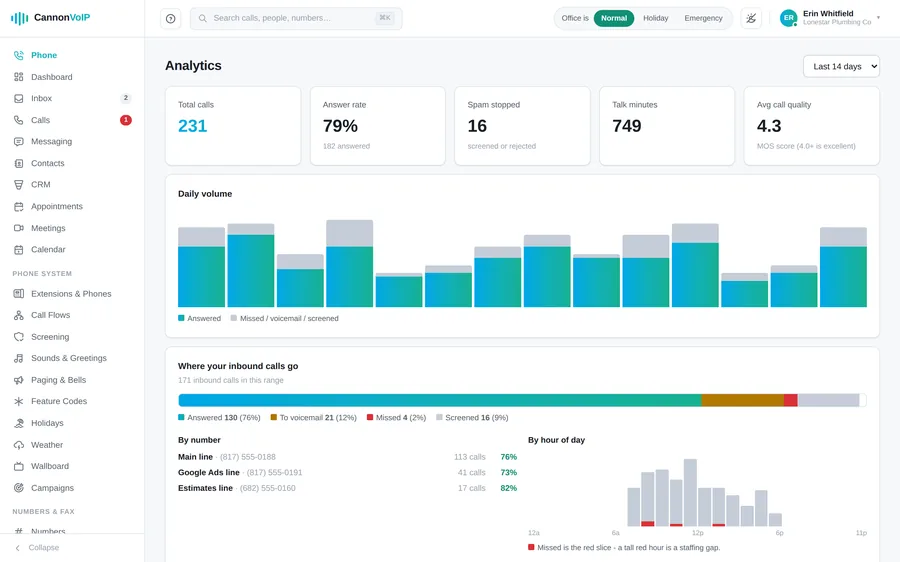
- Analytics over the last 7, 14, 30 or 90 days
- Total calls, answer rate, spam stopped and talk minutes at a glance
- Average call quality score for the period
- See where inbound calls end up: answered, voicemail, missed or screened
- Answer rate per phone number, flagged when below 70 percent
- Calls by hour of day, with missed calls showing staffing gaps
Dashboard
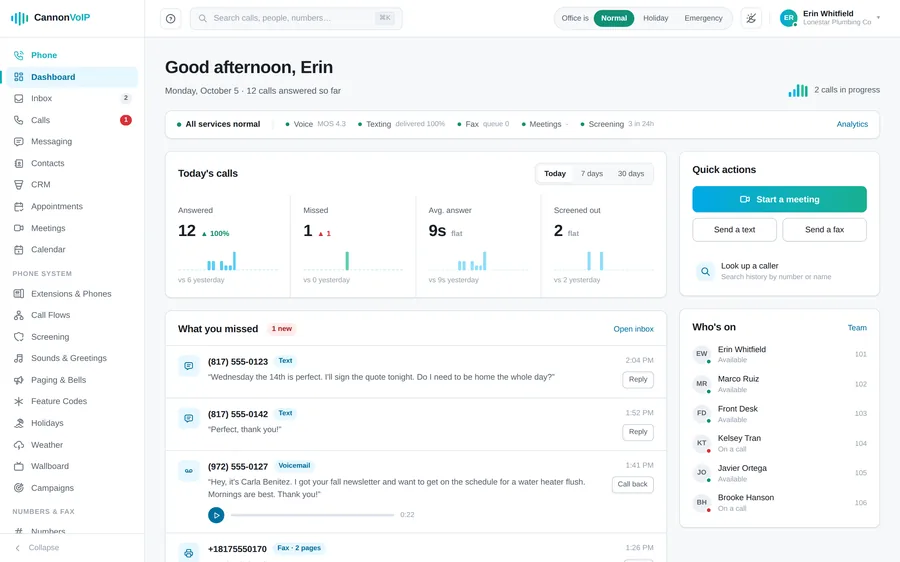
- A personal greeting with today's date and calls answered so far
- Live count of calls in progress
- Service health for voice, texting, fax and screening
- Answered, missed, answer time and screened-out tiles with trends
- What you missed: voicemails, missed calls, texts and faxes, playable in place
- Quick actions to start a meeting, send a text or send a fax
- Who's on, with presence such as lunch, away or on a call
Live answering service
- Real people answer your lines in your company's name
- Separate lines for main, sales, support or one person
- Set the exact greeting agents use
- Question sets for trades, medical, legal, property, auto, salons, restaurants and professional services
- Medical questions stick to scheduling and routing, never symptoms
- See exactly what agents will ask before going live
- Allow or refuse live transfers to your team
- Messages to several email addresses at once, tagged by call type
- Spam, wrong numbers and hang-ups are logged but not emailed
- Track each line's setup status, from submitted to live
Phone numbers, 911 and caller trust
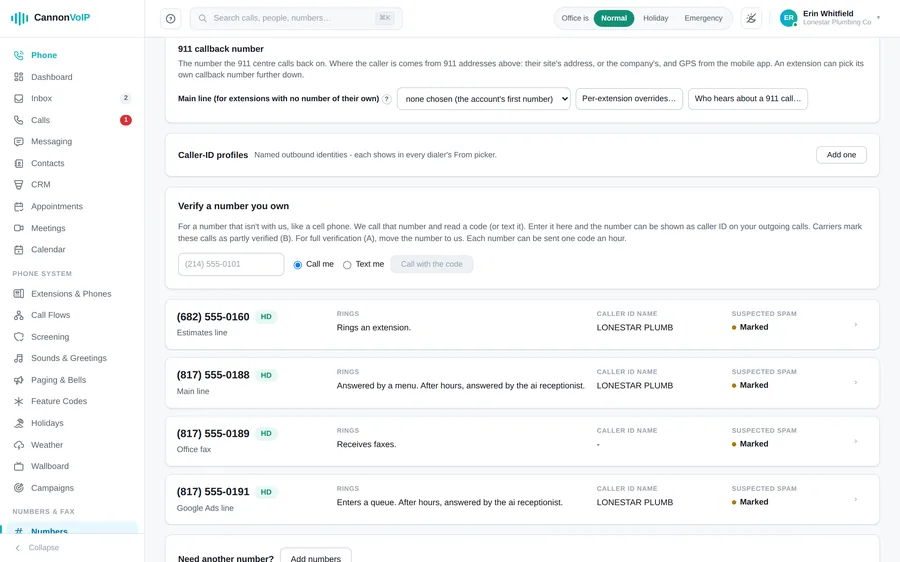
Phone numbers
- Search by area code, city, state or rate center
- Local, toll-free, national and mobile numbers
- Match numbers that start with, contain or end with chosen digits
- Filter for numbers that can text, send pictures or fax
- Show only numbers ready for same-day activation
- Buy up to ten numbers at once
- New numbers join your approved texting campaign automatically
- Each number card says in plain words who it rings
- Business hours and an after-hours destination per number, in its own time zone
- Nickname each number for your team; the nickname shows wherever a number is picked or listed
- Distinctive ring, HD voice and call recording settings per number
- Mark a number receive-only so nobody can call out as it
- Toll-free numbers turn away calls from outside the US unless you allow them, number by number
- Release a number with a two-step confirmation, with a warning before releasing your only number
Bringing numbers with you
- Port numbers in from your current US carrier
- The order is checked for missing details, duplicates and invalid numbers before you sign
- Asks for the service address, not the billing address
- Your old account PIN is saved but never shown again
- Sign the letter of authorization by typing your name
- Refresh the order's status from the carrier any time
- Confirmed port date and rejection reasons shown on the order
- Reopen a rejected order, fix it and resubmit
- Download an info sheet with everything a new carrier asks for
- Keep a port-out PIN on each number, with a log of every port-out attempt
911
- 911 dials straight out with no prefix, and 9-911 still works out of habit
- A 911 caller hears ringing at once, and the call goes out even when the system is busy
- If a 911 call cannot be placed, it is tried again, and then the caller is told to hang up and redial
- 911 gets past Do Not Disturb, calling restrictions and billing holds, and works on suspended accounts
- Each 911 call presents the extension's own number, or the company's main line when it has none
- Register a 911 address on each number, checked with 911 systems before registering
- The address form pre-fills from your service address, and suggestions are never forced
- A warning banner for numbers without a 911 address
- The Numbers screen shows each 911 address and whether the carrier has it ready
- Each building can be a 911 site with its own address, and desk phones send their building's address
- Give an extension its own 911 number for another site
- 911 calls from the mobile app send the phone's location, or the account address when there is no location fix
- The apps show the address and callback number a 911 call would send right now
- Choose who is alerted when anyone dials 911, including outside contacts like an alarm company
- Alerts by portal notice, email, text and a phone call that reads the alert aloud
- An instant alert, then a follow-up with how long the call lasted and whether dispatch answered
- Alerts fall back to account admins, never to nobody
- Dial 933 to test 911, showing the callback number and address dispatch would see
- For 30 minutes after a 911 call, no incoming call is filtered or blocked, so dispatch can always call back
- 911, 933, 988, 711 and the other service codes can never be used as extension numbers
- 711 relay, 811 and 988 always go through from any phone, with or without a 9 first
- 211, 311 and 511 go through where your area and carrier offer them, and callers are told in words when they do not
- 611 rings your provider's support line
- 411 directory assistance is not offered; callers hear a short message and are not charged
Caller ID you can trust
- Outbound calls are signed with STIR/SHAKEN caller authentication
- The highest trust rating only when the number truly belongs to the caller
- Incoming call signatures are checked, and a failed check never drops a call
- Caller name lookup on every voice number
- Your company contacts name incoming callers; personal contacts never appear on a colleague's screen
- City and state shown for incoming callers
- Internal and Direct tags for calls from colleagues and our network, which cannot be faked
- International tag on overseas calls
- Colleague photos and your logo pop up on internal calls, never shown to other companies
- Verified branded callers show their name, reason and logo
Administration, security and reliability
A portal that explains itself
- A "?" beside settings explains, in one sentence, what each one does
- Plain-English error messages that say what to fix
- A help menu at the top left with your support code, live help and who to call
- Command-K search across people, contacts and recent calls
- Dark mode that follows your device, or your own choice
- A collapsible sidebar that remembers how you left it
- Sidebar badges count today's missed calls and unheard voicemails
- An updates panel with unread count and mark-all-read
- The portal works on a phone: a menu drawer, tables shown as cards, and full-screen panels
- Every call, voicemail, chat channel, CRM person, deal and ticket has its own link
- Links in emails and notifications open the exact item they are about
- Deleting something important asks you to confirm first
- A screen that cannot load says so, with a Retry button, instead of looking empty
Team and roles
- Invite someone with a name, an email and a role
- Invite links work once and expire after 72 hours, with a backup link shown on screen
- Resend an invite with a fresh link
- Bulk invite up to 200 people from pasted spreadsheet rows, creating or assigning extensions
- Export the team list in the same format the import accepts
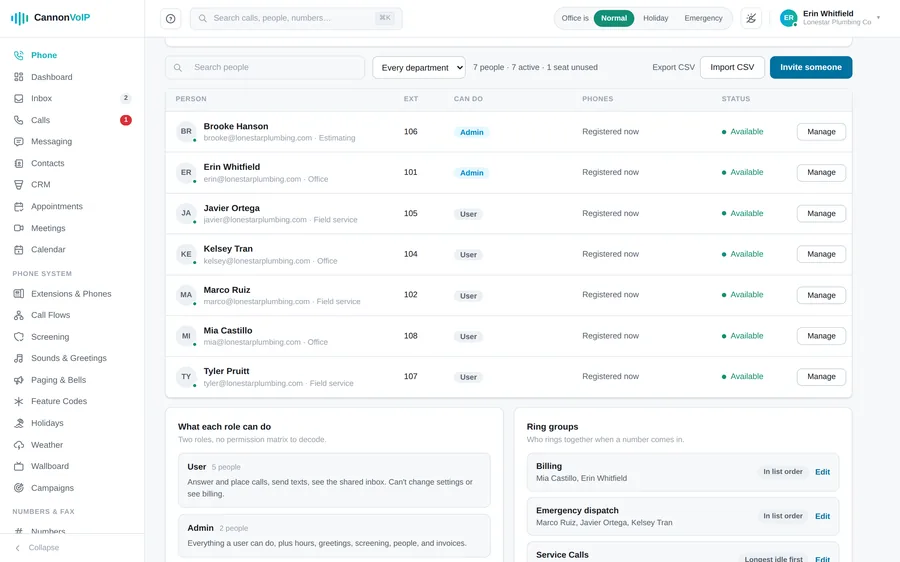
- The team list shows each person's extension, role, phone status and availability
- Edit a person's name, sign-in email, role and extension in one panel
- Tag each person's extension with a department and a building, then filter the team list, call log and reports by them
- Send a phone app invite with a QR code and a one-time sign-in code
- Disable sign-in to offboard someone while keeping their history; it signs them out everywhere
- Delete a team member; their extension, number and voicemail stay for the next person, and past calls keep their name
- Download a person's calls, messages and settings as a ZIP file before they go
- Two built-in roles, User and Admin, plus custom roles like Front desk or Billing clerk
- Build a custom role by ticking permissions grouped by area
- Allow or deny one extra permission for a single person
- You can only grant permissions you hold yourself
- The last admin on an account cannot be demoted, disabled or deleted
- Nobody can disable or delete their own sign-in
Company settings
- Company time zone, suggested from your address and never applied silently
- Company call recording: all calls, inbound only, outbound only, or none
- Override recording per number or per extension, where "off" on an extension always wins
- The "this call may be recorded" notice follows state consent laws automatically
- Recording retention from 1 day to 10 years, with separate periods for meetings
- Legal holds keep recordings, voicemails and faxes past any retention period, explained in plain words
- A company dial-in PIN for calling out as the company from any phone
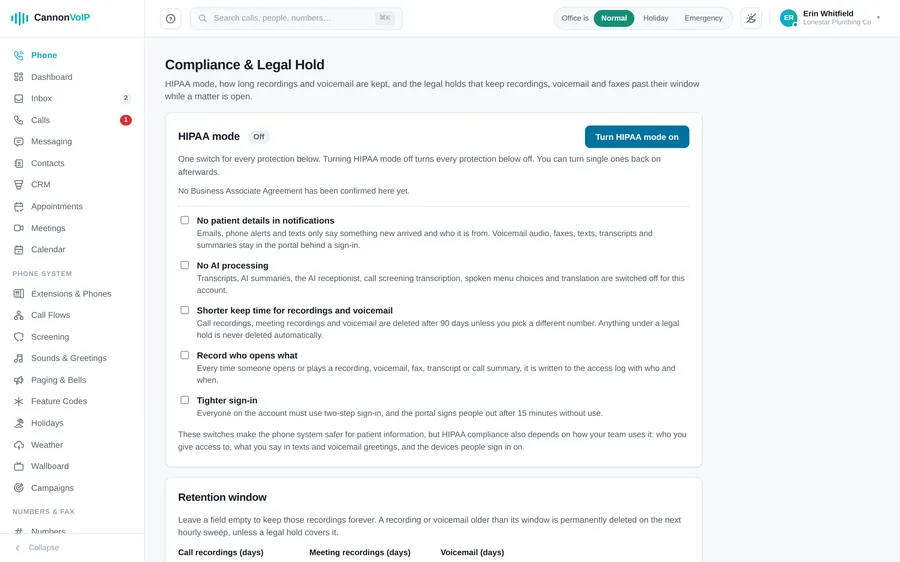
HIPAA mode
- One switch turns on every protection at once, with a switch for each protection underneath
- Turning it on records that you have a signed Business Associate Agreement, with who confirmed it and when
- No patient details in notifications: emails, alerts, and chat and text notifications on a locked phone only say something new arrived
- Webhooks, workflow webhooks and notes sent to an outside CRM leave out transcripts, summaries, recording links, message text, picture links and fax documents
- Optionally switch off AI processing: transcripts, summaries, the AI receptionist, screening transcription and translation
- A shorter keep time for recordings and voicemail, 90 days unless you pick another number
- Clean-up also removes transcripts, call summaries, AI reviews and receptionist conversations, while legal holds still apply
- An access log records who opened or played each recording, voicemail, fax, transcript or summary
- Two-step sign-in for everyone, and the portal signs people out after 15 minutes without use
Sign-in security
- Strong password rules everywhere a password is set
- Single-use reset links that expire, and never reveal whether an email has an account
- Changing your password signs out your other devices
- Changing someone's sign-in email signs them out everywhere and tells the old address
- Repeated wrong passwords lock the account, with an email explaining how to get back in
- An email when a new device signs in, with its approximate location
- Two-factor sign-in with an authenticator app or emailed codes
- Admins can require two-factor for everyone without locking anyone out
- Continue with Google or Microsoft, for existing active users only
- Two-step sign-in still applies after you continue with Google or Microsoft
- See everywhere you are signed in and sign out everywhere else with one button
- Lock sign-in to your office networks with an IP allow-list, with a warning before you lock yourself out
- A rotating six-digit support code proves who you are when you call support
- A read-only demo account for prospects
Protection against fraud
- International calling can be switched off, and the costliest destinations stay blocked until agreed
- Caribbean numbers that use +1 are treated as international
- Transfers and call flips to outside numbers follow the same international and suspension rules as a dialed call
- International spending is watched around the clock
- Unusual dial-in calling is flagged as a possible leaked PIN
- Password-guessing and scanning at the network edge are blocked automatically
- Offices that sign in successfully are never blocked by mistake
- Saved credentials and two-factor secrets are encrypted at rest
- Recordings open through short-lived private links
- A suspended account cannot call out, but 911 always works
Call quality and audio
- Every call gets a quality score (MOS), with jitter, packet loss and latency saved
- Desk phone calls are scored too, and the worse side of the call sets the score
- Calls with no measured audio show blank, never a false perfect score
- HD voice first (Opus and G.722), with G.711 for older equipment
- Call audio is relayed through our servers rather than sent directly between phones
- Apps behind strict firewalls connect through an encrypted media relay
- A built-in network check in every app, even before signing in
- The network check measures latency, jitter and packet loss, and detects double NAT
- App calls are encrypted in transit, both signaling and audio
Reliability and your data
- The full database is backed up every minute, stored off-site
- Backups are checked for completeness, and restores are practiced before they are needed
- Recordings, voicemails and faxes go to durable cloud storage as they are created
- Updates let live calls finish before a server restarts
- The portal and sign-in run as more than one copy, so one failing does not take them down
- Apps remember backup server addresses in case DNS fails
- Around-the-clock monitoring of every server and service
- A public status page that does not depend on the portal app, with a machine-readable feed
- Download everything in your account as a single file at any time, from a plain Your Data page
- Every settings change is logged with who, when, before and after
- Close your account yourself with emailed confirmation, after being offered an export
Help and support
- A built-in help center with articles grouped by topic
- Ask a question and get an answer with cited articles
- Support tickets with response targets by priority, from one hour for urgent issues
- Dial 611 from any phone on your account to reach support
- Live help lets support see your portal screen; helpers can point but never click, and password fields are masked
- Only one helper can join your screen at a time, and every session is logged
- Unexpected errors show a short reference code, not technical details
Getting started and moving from another system
Guided setup
- Guided setup takes a new account from a company name to a ringing phone
- Seven steps: company, services, import, people, numbers, answering and phones
- Every step saves as you go, so stopping halfway loses nothing
- Service address entry offers suggestions as you type
- Create extensions and invite administrators in the same step
- Add extensions ten rows at a time, remove rows you do not need, and invite each person with a role
- Point the main number at a person with weekday opening hours in one step
- A dashboard checklist tracks team, greeting, after-hours, mobile app and 911
- Each unfinished checklist item links to the screen that fixes it
- New accounts confirm their team and 911 addresses before anything else, and only the people who can do that are asked
Imports from other phone systems
- 3CX: live import from version 18 update 7 or version 20, or older systems from a backup file
- FreePBX, PBXact and Issabel from a backup
- RingCentral live, using app credentials
- PortSIP by signing in and choosing a tenant
- Grandstream UCM, Yeastar S-Series and P-Series, and 8x8 from their exports
- Any other system from a spreadsheet of extensions, names and emails
- Paste an export or upload the file
- A migration kit template that can describe a whole phone system, with a field guide
- Hand the kit to an AI assistant to fill in from old exports
- The kit carries groups, queues, menus, hours, contacts, block lists and desk phones
- Review a plan with counts before anything is applied
- An import report lists anything that could not be carried across
- Imported people are invited and set their own passwords
- Every imported extension gets fresh phone credentials
- Menu wording from 3CX, PortSIP, RingCentral and spreadsheets needs no re-recording
- Choose whether phone numbers come across with an import, and give them back in one step
- Your old system keeps taking calls until your numbers port
Universal import
- Works with any phone system you can read settings from
- Type or paste people, emails, desk phone models and MAC addresses
- Desk phone models are recognized from short names like T46U or VVX 450, and never guessed
- Mark whether each number reaches a menu, a group or one person
- Imported groups keep the company's hold music
Recovering your old menus and greetings
- Optional discovery calls ring your old system and record what its menus say
- Explores two menu levels deep, with a cap on calls per number
- Shows each old menu prompt word for word
- Keep the old system's own recordings: spoken prompts and greetings come across as sound files
- Or have the same words re-spoken in a new professional voice
- Play any captured recording in the portal before you decide
- Music and silence are never kept as prompts
- Proposes each key's destination with the reason for the match; keys it cannot place are listed
- Nothing changes until you press Apply, and existing keys are never overwritten
- A voicemail mode recovers the wording of old greetings, one extension at a time
- A live progress chart shows numbers queued, calling, done and failed
- Discovery calls stay silent and hang up if a person answers
- Discovery needs a signed statement that you own the numbers
- Paced to a safe hourly rate, and can be stopped at any time
Built-in CRM
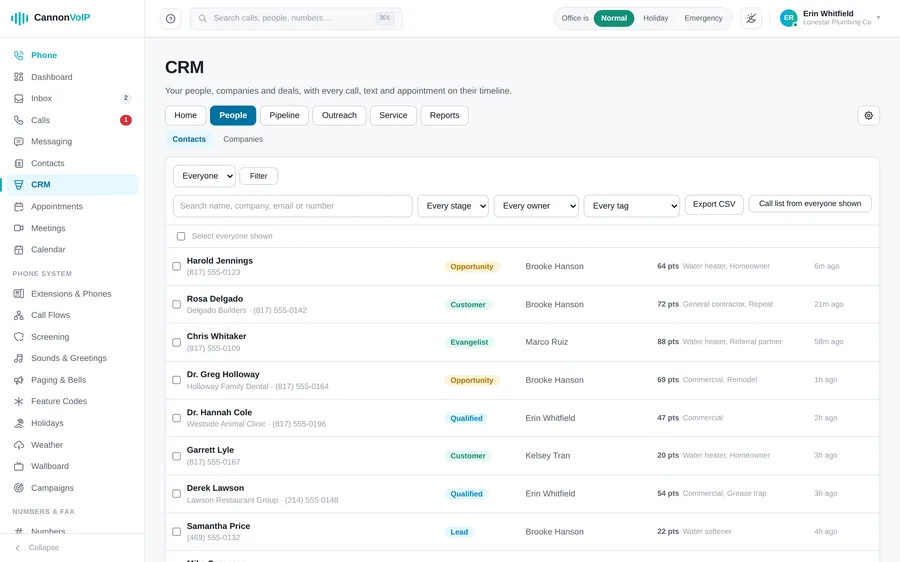
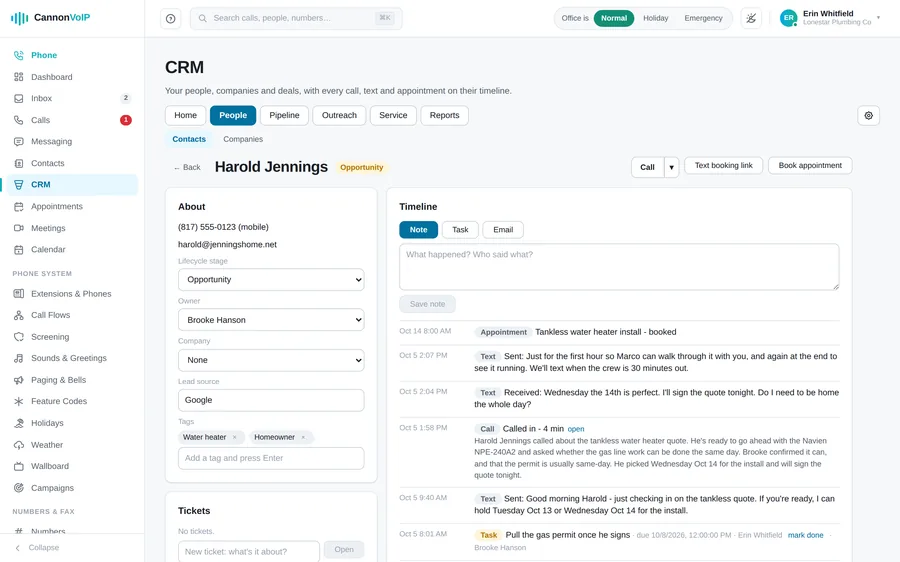
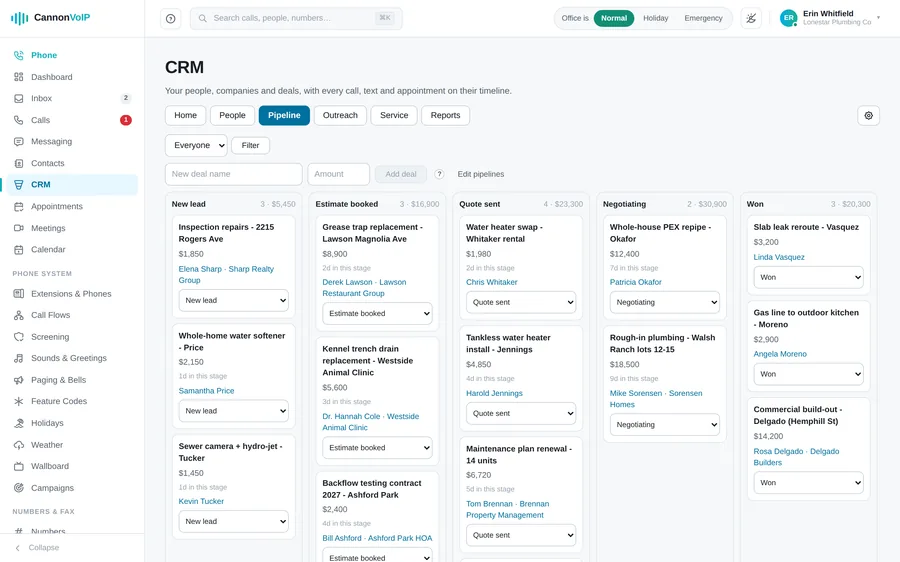
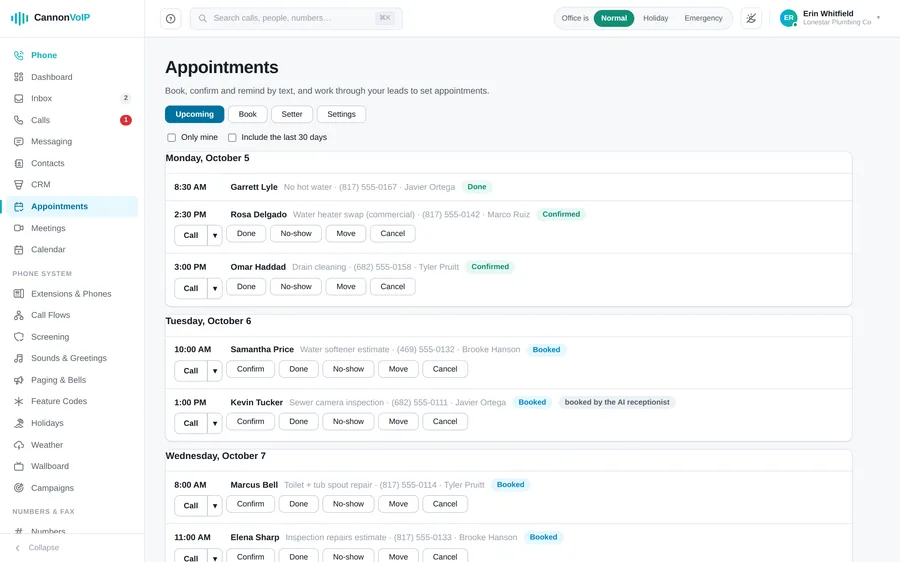
A full CRM inside the same portal and apps as your phones, so calls, texts, emails, appointments and tickets land on the right person's record without copying anything between systems. It is included with every account at no extra cost; we switch it on for you, along with the Appointments page that comes with it.
People, companies and deals
- People with an owner, tags, a lifecycle stage and the source they came from
- Companies, with their people and their deals
- Deals on pipelines you set up, moving through stages until won or lost
- Several pipelines, each with its own stages and win chances
- Stages can have a time limit, and deals that sit too long are flagged as stuck
- One timeline per person: notes, tasks, stage moves, calls, texts, emails, appointments, tickets and chats
- Calls and texts on the timeline are read from the call log and inbox, so the two never disagree
- Tasks with due dates, with lists of your own tasks and overdue ones
- Add your own fields: text, numbers, money, dates, dropdowns, checkboxes, links, emails and phone numbers
- Every record keeps a history of who changed what, and when
- Saved views keep the filtered lists you use every day
- Change many records at once, and export any list as a spreadsheet
- Choose what each rep sees: every record, only their own, or their own plus unassigned ones
- Find duplicate people and companies and merge them; the record you keep fills its blanks and loses nothing
- Import a spreadsheet straight into CRM fields, matching people by email or phone
- Imports do not start workflows unless you ask, so old leads never get a flood of welcome emails
- Six simple areas: Home, People, Pipeline, Outreach, Service and Reports, with setup behind a gear for managers
Website forms
- A form builder with questions for text, email, phone, numbers, dates, times, choices, ratings, addresses, consent and file uploads
- Multi-step forms, with questions and pages that show only when earlier answers call for them
- Headings, paragraphs and dividers to lay a form out, and a design to match your website
- Start from templates: contact us, call back request, consultation booking, newsletter sign-up, support request, job application or feedback
- Put a form on your website with one line of code, or share it as a hosted page
- Serve forms from your own subdomain, with its security certificate set up automatically
- Each answer finds the person by email or phone, or adds them as a new lead, with the page and campaign tags it came from
- A form can never overwrite a saved person's email or phone; new details are kept as "unverified, from a form"
- Optionally create a follow-up task, email the team, or text the person back when they gave consent
- Built-in spam protection: a hidden trap field, a minimum fill-in time and a cap per address
- See every submission and simple stats for each form
Automation
- Workflows that start when a form is answered, a deal moves, wins, loses or gets stuck, or an appointment is booked
- Or when a text or call comes in, a chosen keyword comes up on a recorded call, or an email is opened, clicked or replied to
- Or when a ticket is opened, solved or late, or when a person comes to match a filter, like "no activity for 14 days"
- Steps can set a field, tag, assign, make a task or deal, text or email the person, notify the team, call a webhook, wait, or stop if something is true
- Round robin assignment shares new leads evenly across a team
- Lead scoring adds points for a person's details and recent activity
- Waits of minutes, hours or days pick up exactly where they left off
- Workflows cannot set each other off in an endless loop
- Every workflow email carries an unsubscribe link
- See each workflow's runs, and stop one for a single person
Email and sequences
- Connect each person's own Gmail or Microsoft 365 mailbox; mail leaves from their real account and replies come back to their inbox
- Email templates, scheduled sends, and a reminder task if nobody replies
- Optional open and click tracking
- Mail with your contacts lands on their timeline, from Microsoft 365 mailboxes and from Gmail where mail reading is turned on
- Each person chooses whether all mail with contacts is logged or only mail sent from the CRM, and which addresses never are
- Sequences: a series of emails, texts, call tasks and other tasks spread over days
- Sequences stop on their own when the person texts back, books or unsubscribes, and when they reply to an email on a mailbox the CRM can read
- Every sequence email carries an unsubscribe link
Calling from the CRM
- Call lists a rep works one person at a time: call, note what happened, next
- The person's record is open while you dial, and the outcome lands on their timeline
- "Call back Tuesday" becomes a task
- Calls go out from your desk phone, the mobile app or the browser phone, with your normal caller ID and recording
- Drop a recorded voicemail onto the call you are on, including from a desk phone
- Call summaries appear on the person's timeline
- Keyword alerts: choose words to listen for on recorded calls and see on the timeline when they come up
Reports and dashboards
- A report builder that groups and counts people, deals and activity your way, including your own fields and tags
- Arrange saved reports on dashboards
- A sales forecast, a funnel showing how fast deals move, and where your leads come from
- A leaderboard and quotas for each rep
- Months, weeks and days follow your business's time zone
- Reports follow who may see what, so a rep never sees a deal they could not open
- A report too large to show in full says so instead of quietly undercounting
Service desk
- Tickets for your own customers, numbered and prioritized
- Response and resolution promises by ticket kind and priority, with late tickets flagged
- Reply by email from your own mailbox or by text, and the customer's answer lands back on the ticket
- Solving a ticket can send a one-question satisfaction survey by text or email
- Website chats link to the person's record
- Tickets appear on the person's timeline
Appointments and the booking page
- An Appointments page to book, move, confirm, finish, mark no-show or cancel
- Set your opening hours, appointment length and the texts that go out
- A confirmation text when an appointment is booked, and a reminder before it
- Customers reply C to confirm or R to ask for a new time
- Moving or cancelling withdraws the old reminder before the new text goes out
- Bookings made by the AI receptionist get the same texts
- A public booking page where your customers pick an open time themselves
- Text someone your booking link, or replace the link to switch off old copies
- A time slot can never be double booked, and the booking page is protected against floods of requests
- A setter tab for appointment setters: a queue of leads to call, call outcomes, booking on the spot and weekly stats
- Appointments show on the portal calendar
- Appointment texts follow the same opt-out and carrier registration rules as every other text
CRM on the phone
- A contact's page in the Android app shows their CRM card: stage, owner, open deals, open tasks and recent activity
- Add a note or a task from the phone
Integrations, API and add-ons
CRM and calendar integrations
- Keep your own CRM if you prefer: sync contacts from HubSpot, Zoho, Salesforce and Microsoft Dynamics 365
- Also GoHighLevel, Zendesk, Freshdesk, SugarCRM, Odoo, Housecall Pro and CallRail
- Contacts sync every six hours, or on demand
- Synced contacts name callers and appear in screen pops
- Log finished calls into HubSpot, Zoho or GoHighLevel; internal calls stay out
- Sync your own Google contacts into your personal list
- Google Calendar events join your meetings agenda
- Recent Gmail threads shown beside each contact
- Google access is read-only and removed on disconnect
API and webhooks
- API keys use the same API as the portal
- Pick exactly which areas a key may view or manage
- Keys can never manage users, sign port papers or touch billing, and never outrank their creator
- Each key is shown once, stored securely, and can be revoked instantly
- Keys expire after a year by default, or up to two years if you choose
- See when each key was last used
- Webhooks for calls, missed calls, texts, voicemails, faxes, meetings, recordings, tickets, new contacts, form submissions and port-outs
- Every delivery is signed with HMAC SHA-256 and a timestamp
- Failed deliveries retry with backoff, and a receiver that was down gets missed events later
- Send a test event and see recent deliveries with status and errors
- A call record feed posts every finished call to your own system
Your own phone system
- Connect your own phone system with a SIP trunk
- Authenticate by registration or by source IP address, including ranges
- Calls in and out, including calls to other companies on our network
- Set the ring time and a failover destination for when your system does not answer
- A default caller ID, with international calling blocked unless you allow it
- Record outbound calls from the trunk
- See whether a registration trunk is currently registered
- Cap concurrent calls to stop a runaway system
- Rotate the trunk password any time, or switch a trunk off without deleting it, with a confirmation first
- Point any of your numbers at a trunk
- Text and picture messaging over the trunk with its own API key, with opt-out rules applied
Add-ons
- AI Receptionist: $65/month, or free with 10 or more users
- Cloud eFax with a monthly fax allowance: $10/month
- Branded Calling + RCS: your name and logo on outgoing calls plus branded texting, $45 one-time setup then $40/month per block of 25 extensions, messages included
- Live answering service: $140/month per line, including 60 minutes of agent time
- Add-ons switch on immediately from the in-portal store, prorated from the day added
- Each add-on shows its price for confirmation before you commit
For partners
- Sold and supported directly by Cannon VoIP, and through authorized partners
- Partners can offer the platform under their own brand, domain and support number
- Partner-branded accounts show the partner's name in the About screen and the browser tab title
See it with your own numbers in it.
We'll walk you through a live setup for your business. No contracts, no pressure, $34 per extension.