Serving businesses nationwide
Cannon VoIP Contact Us
Back to blog
Integrations · CRM

A Built-In CRM, Plus the CRM You Already Use

A full CRM now comes with every extension at no extra cost. Prefer your own? Eleven CRM and helpdesk platforms connect natively, no code, no middleware.

Published August 7, 2026 · Cannon VoIP Team

Most teams live in their CRM or helpdesk, not in their phone system. Every call that isn't logged there is a follow-up that slips, a note that never gets written, and a customer history with holes in it. Cannon VoIP closes that gap two ways. A built-in CRM sits right beside your calls and texts, included with service. Or, if you would rather keep the CRM you have, our integrations name callers from it the moment they call, and with HubSpot, Zoho and GoHighLevel every finished call logs itself where your team actually works.

A built-in CRM, included with every extension

Cannon VoIP now includes a full CRM in the same portal and apps as your phones, at no extra cost: it is part of the $34 per extension price, and we switch it on for your account, along with the Appointments page that comes with it. Calls, texts, emails, appointments and tickets land on the right person’s record without copying anything between systems, and calls and texts on the timeline are read straight from the call log and inbox, so the two never disagree.
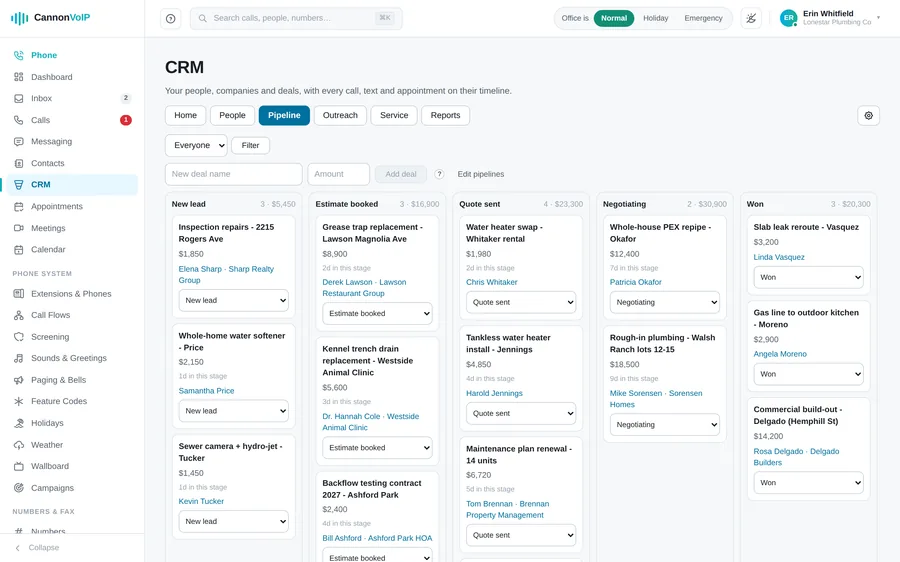
Deals moving through a sales pipeline in the Cannon VoIP built-in CRM
People, companies and deals
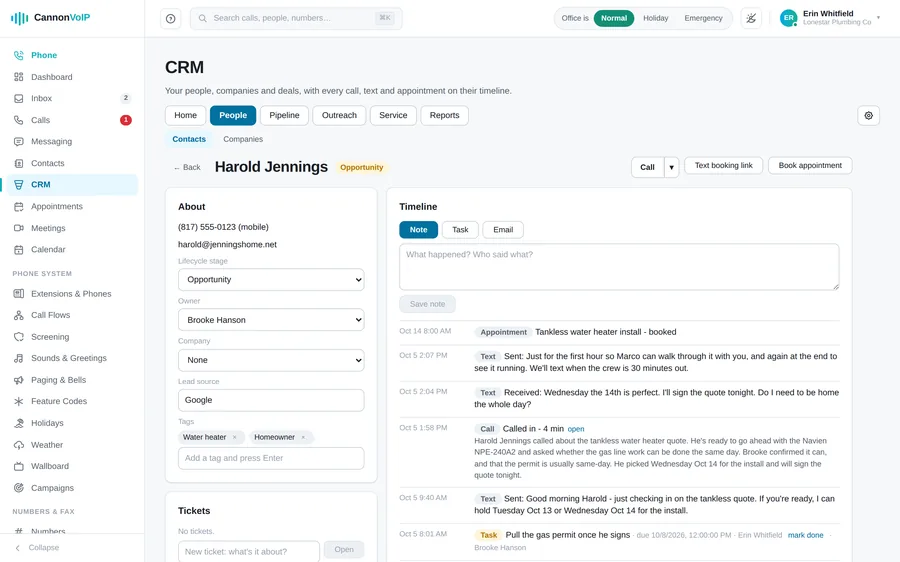
People and companies with owners, tags and lifecycle stages. Deals move through your own pipelines, with time limits on stages and stuck deals flagged. Each person has one timeline of notes, tasks, calls, texts, emails, appointments, tickets and chats.
Tasks, fields and clean data
Tasks with due dates, your own custom fields, a change history on every record, saved views, bulk edits and spreadsheet export. Choose what each rep sees, merge duplicates, and import a spreadsheet straight into CRM fields.
Website forms
A form builder with multi-step and conditional questions and ready-made templates. Add a form with one line of code or share a hosted page on your own subdomain. Answers create or match leads, with built-in spam protection.
Automation
Workflows start from forms, deal stages, appointments, texts and calls, keywords on recorded calls, email opens and replies, or tickets. Steps set fields, tag, assign, create tasks or deals, send texts and emails, notify the team or call a webhook. Round robin assignment and lead scoring included.
Email and sequences
Connect each person’s own Gmail or Microsoft 365 mailbox, so mail leaves from their real account. Templates, scheduled sends, optional open and click tracking, and sequences of emails, texts and call tasks that stop when the person replies, books or unsubscribes.
Calling from the CRM
Work a call list one person at a time, with the record open while you dial and the outcome landing on the timeline. Drop a recorded voicemail, and see call summaries and keyword alerts right on the timeline.
Reports and dashboards
A report builder, dashboards, a sales forecast, a funnel, lead sources, and a leaderboard with quotas for each rep.
Service desk
Tickets with priorities and response and resolution promises. Reply by email or text, and send a one-question satisfaction survey when a ticket is solved.
Appointments and booking page
Book, move, confirm, finish, mark no-show or cancel. A confirmation text goes out when an appointment is booked and a reminder before it, and customers reply C to confirm or R for a new time. A public booking page never double books, and AI receptionist bookings land here too.
CRM card in the Android and iPhone apps
A contact’s page in the Android and iPhone apps shows their stage, owner, open deals, open tasks and recent activity. Add a note or a task from the phone.
A person’s CRM record in the Cannon VoIP portal, with their timeline of calls, texts and notes

Website chats link to the visitor’s CRM record too, so a chat, a form answer and the follow-up call all end up in one place.

Keep your own CRM if you prefer

Already running your business on another CRM or helpdesk? Keep it. Eleven outside platforms connect natively, and here is what the integrations do:

Click-to-call
Click any phone number inside your CRM and the call dials from your extension, no re-typing, no misdials.
Contact sync and screen pops
All eleven platforms sync contacts every six hours, or on demand. Synced contacts name your callers and appear in screen pops, so your team knows who is calling before they answer.
Automatic call logging
In HubSpot, Zoho and GoHighLevel, finished calls log against the right contact automatically, instead of whatever someone remembered to type. Internal calls between colleagues stay out.

Eleven platforms, all live

These aren't "coming soon" logos, every one of these connects today:

Salesforce
Salesforce
HubSpot
HubSpot
Zoho CRM
Zoho CRM
Microsoft Dynamics 365
Dynamics 365
GoHighLevel
GoHighLevel
Zendesk
Zendesk
Freshdesk
Freshdesk
SugarCRM
SugarCRM
Odoo
Odoo
Housecall Pro
Housecall Pro
CallRail
CallRail

Plus Microsoft Teams, Microsoft 365, and Google Workspace alongside them.

Which one fits your business?

  • Salesforce & Dynamics 365: the enterprise standards. If your sales org already runs on one of them, your contacts sync to the phone system, so callers show by name and in screen pops.
  • HubSpot & Zoho CRM: favorites for small and mid-size teams. Finished calls log automatically on the records your team works from daily.
  • Zendesk & Freshdesk: helpdesk-first. Callers are recognized from your helpdesk contacts, so the agent knows who is on the line before answering.
  • GoHighLevel: the agency platform. Finished client calls log automatically inside the same system running your campaigns and funnels.
  • Housecall Pro: built for the trades. Your Housecall Pro customers are named on the incoming call, so you know who is calling about which job.
  • CallRail: marketing attribution. CallRail contacts sync in, so callers from your campaigns are named when they call back.
  • SugarCRM & Odoo: for teams on open or self-managed platforms, with the same click-to-call and contact syncing as everyone else.

Google contacts, Calendar and Gmail

Each person can also connect their own Google account:

  • Google contacts sync into your personal contact list, so the people you know are named when they call.
  • Google Calendar events join your meetings agenda in the portal.
  • Recent Gmail threads show beside each contact, so you see the latest emails before you call.
  • Read-only access: Google access is read-only and removed when you disconnect.

What it costs and how it gets set up

The built-in CRM and the outside CRM integrations are both part of Cannon VoIP service, not a paid add-on tier. We switch the built-in CRM on for you. Connecting an outside CRM takes an admin sign-in and consent step on the CRM's side, and our team walks through it with you during onboarding (or any time after). If you switch CRMs down the road, we reconnect the new one the same way.

Running something custom or in-house instead? The Cannon VoIP API and webhooks cover software that isn't on this list.

See these integrations in context on our real estate and home services pages.

Ready to put your customers beside your calls?

Tell us how you track customers today. We'll switch on the built-in CRM, or have your own CRM syncing before your next stand-up.

Talk to us about CRM integration

Recent posts

See all
TECH TIPS

Tools for troubleshooting your VoIP service

VOIP

Understanding and using DISA

VOIP

Cannon VoIP eFax: send and receive faxes from email or your browser