
When a phone system provider says "you get an admin portal," it usually means you can change your voicemail greeting and see a call log. Everything real, a new extension, a changed call flow, holiday hours, goes through a support ticket, and you wait.
The Cannon VoIP Portal is different for a structural reason: we built our own platform, apps and switching, and interconnect with two carrier partners, so there's no third-party vendor between the portal and the system it controls. When we wanted the portal to manage everything, we just built it that way.
The phone system, fully editable
Extensions, ring groups, call queues with a live wallboard, multi-level phone menus, business hours per phone number, a holiday calendar, voicemail and shared voicemail boxes, feature codes, call park and pickup, music on hold, company contacts, call history, and call recordings. All of it is in the portal, all of it is editable by you, and every change is live the moment you save it. A company status switch in the portal header (Normal, Holiday, Emergency or Snow Day) changes routing for the whole company in one click, and a banner reminds everyone while it is on.
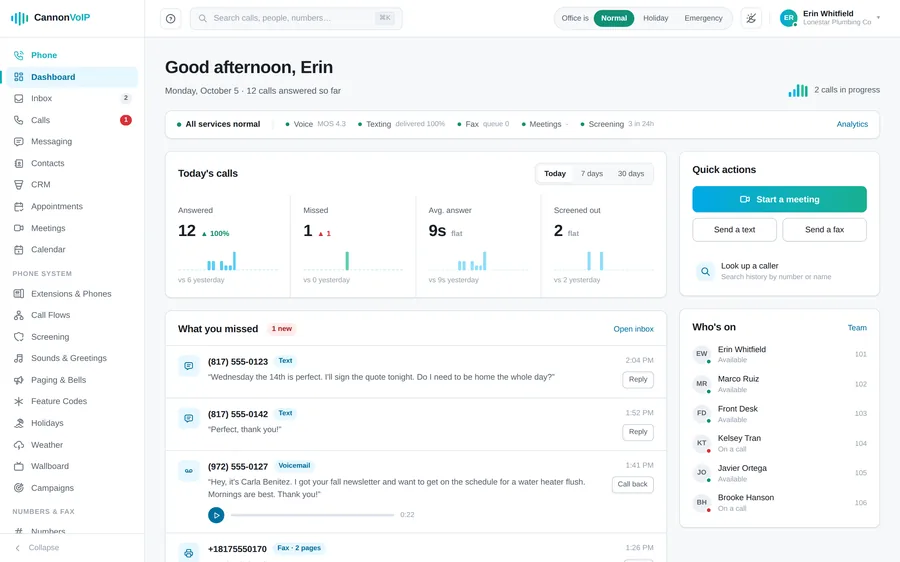
Every call explains itself
Each call in the call log has a "What happened" panel: step-by-step notes of where the call went and why, which phones rang and for how long, who answered, and when screening, a block or a caller timeout changed the call. The dashboard shows today's answered and missed calls, live calls in progress, service health, and everything you missed, playable in place. Analytics and scheduled reports cover the rest.
Phones that configure themselves
Our Cannon Certified desk phones treat the portal as their home base. Plug a new phone into any internet connection and it fetches its own configuration, line settings, your company directory, ringtones, display preferences, and keeps itself in sync afterward. Factory-fresh Fanvil, Yealink and Grandstream phones set themselves up the same way, and Cisco and Poly phones set up with a one-time link. A new hire means adding an extension in the portal and handing over a phone still in its box. If a phone misbehaves, the one-click Diagnose screen gives a one-line verdict and a plain next step.
eFax and business texting, same login
Faxing lives in the portal too: send from the browser or straight from your email, with automatic PDF conversion, cover pages, scheduled sends, and saved recipients, and existing fax machines keep working through our adapters. Received faxes land in the same inbox as voicemail and texts. Texting goes well past simple SMS: a shared text inbox with a tab for each number, templates, keyword auto-replies, scheduled messages, bulk campaigns with automatic opt-out handling, and 10DLC carrier registration from the portal so your messages actually deliver.
The AI receptionist, under your control
Your AI receptionist is configured right in the portal: what it says, what it knows about your business, and what it's allowed to do. It transfers calls by name, books appointments mid-call into its own appointment calendar (offering only times that are actually free), takes messages, and texts callers back. Test it by typing, with your real settings, before a caller ever hears it. Every handled call is emailed to you with the full conversation, and messages are saved in the portal.
A built-in CRM, right beside your calls
The portal now includes a full CRM at no extra cost: people, companies and deals on your own pipelines, website forms, automation, email and sequences from each person’s own Gmail or Microsoft 365 mailbox, call lists, reports, a service desk, and an Appointments page with confirmation and reminder texts. Calls, texts, emails and appointments land on the right person’s timeline on their own. More on the built-in CRM.
Eleven CRM integrations, connected by you
Zoho CRM, HubSpot, Salesforce, Microsoft Dynamics 365, GoHighLevel, Zendesk, Freshdesk, SugarCRM, Odoo, Housecall Pro, and CallRail. You connect your own CRM from the portal in a couple of minutes. Contacts sync every six hours or on demand, so synced contacts name your callers and appear in screen pops. With HubSpot, Zoho and GoHighLevel, finished calls also log into the CRM automatically. Microsoft Teams and Google Workspace round out the list.
Numbers, porting, 911 and branded calling
Your number inventory, new number orders, port-in tracking, and 911 addresses are all managed in the portal. You choose who is alerted when anyone dials 911, and the Numbers screen shows each 911 address and whether the carrier has it ready. Each building can be a 911 site with its own address, and 911 calls from the mobile app send the phone’s location. Branded Calling + RCS means your business name and logo can display on outbound calls instead of an anonymous number, and your texts can carry your brand too.
Meetings, chat and your website
Newer areas of the portal cover more than the phones: video meetings with a permanent room link and dial-in from any phone, a built-in calendar, team chat channels, and a website chat bubble your staff answer from the portal. Team and roles let you invite people, build custom roles like Front desk, and require two-factor sign-in.
And an API when you outgrow clicking
A documented REST API covers click-to-call, live call control, call events, SMS, faxing, and records, so your own software can drive the system directly. Signed webhooks push calls, missed calls, texts, voicemails, faxes, meetings, recordings, tickets, new contacts, form submissions and port-outs to your systems in real time. You can also connect an AI assistant like Claude, Gemini or ChatGPT, with high-risk actions waiting for a person to approve. The API guide covers what's possible.
Self-service is a choice, not a requirement
Here's the part we mean sincerely: the portal exists so you can do everything yourself, not so you have to. Our US-based support team makes the same changes for you on a phone call, and most customers use both. Either way, it's included: no "admin portal tier," no per-feature unlock fees.
See it with your own numbers in it
We'll walk you through a live setup for your business. No contracts, $34/extension.
Get your free quote